Build note · Agentic AI
MCP from First Principles: What It Is, Why It Exists, and How I Built a Wikipedia Research Assistant
What the Model Context Protocol actually is, why it exists when APIs already work, and what I learned building a Wikipedia research assistant on it.
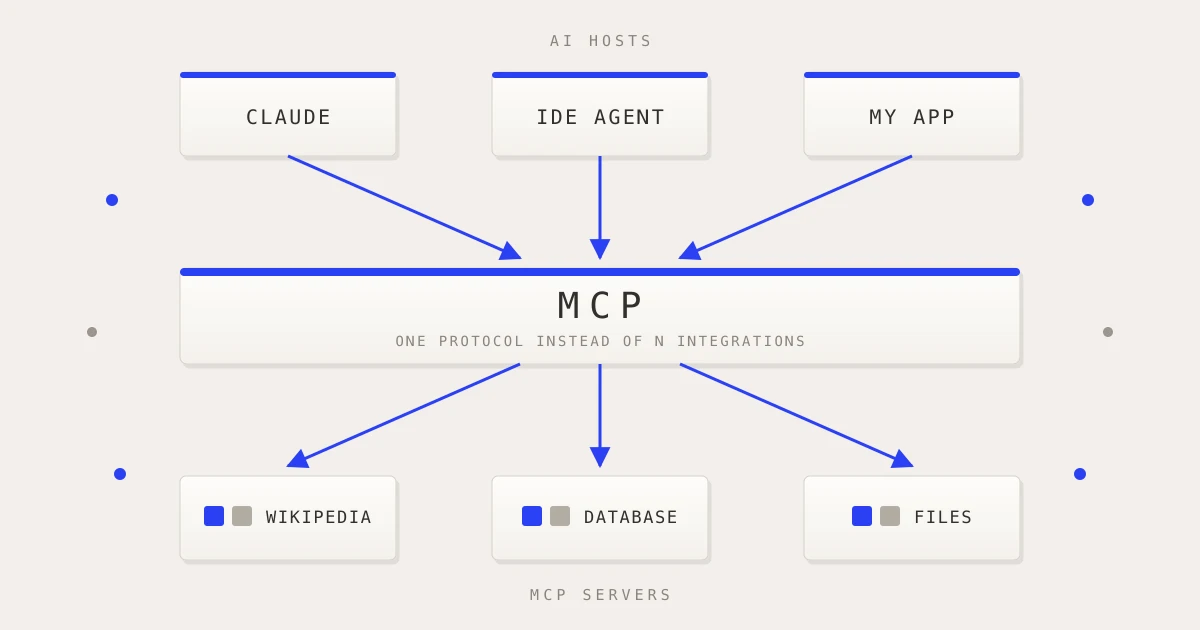
In brief
MCP is a standard protocol connecting AI applications to tools, data and context. I built a small Wikipedia research assistant to find out what it does underneath the abstractions, and this is everything I learned while building it.
Article contents (65 sections)
- 1. What is MCP?
- 2. Why do we need MCP at all?
- 3. MCP is not “an AI framework”
- 4. Host vs Client vs Server
- 5. What exactly can an MCP server provide?
- 6. My project: the problem I wanted to understand
- 7. The most important mental model: Claude does not execute my MCP tool
- 8. What does a tool actually look like?
- 9. Why the schema matters
- 10. What is actually travelling between the client and server?
- 11. JSON-RPC is not MCP
- 12. Requests vs notifications
- 13. What is a transport?
- 14. Stdio transport
- 15. What does “pipe” mean?
- 16. Stdio means stdin/stdout/stderr
- 17. Process vs thread
- 18. Why not just use a normal function call?
- 19. The complete Claude tool-calling loop
- 20. Claude does not have to know how Wikipedia works
- 21. Where does the Anthropic API key live?
- 22. What if a third-party company wants to use my MCP server?
- 23. What is sampling?
- 24. What are Roots?
- 25. Saving a report with an MCP root
- 26. Path traversal and why I validate the final path
- 27. URL paths vs filesystem paths
- 28. Logging and progress
- 29. Progress is not a timer
- 30. onUpdate is how I carry those events through my application
- 31. The browser cannot magically see those callbacks
- 32. Why my API route uses Node.js
- 33. Edge vs Node
- 34. From callbacks to HTTP streaming
- 35. What is NDJSON?
- 36. TextEncoder and TextDecoder
- 37. Reading the HTTP stream in the browser
- 38. Then JSON.parse finishes the journey
- 39. The full streaming architecture
- 40. A pipe is not NDJSON
- 41. Streamable HTTP
- 42. Why HTTP is harder than stdio
- 43. SSE vs WebSockets
- 44. The older Streamable HTTP architecture I learned
- 45. stateless_http
- 46. json_response
- 47. Why my course material needs a 2026 footnote
- 48. Important 2026 note about my Roots/Sampling/Logging code
- 49. Why my API uses runtime = "nodejs"
- 50. Why this project is a monorepo
- 51. The Wikipedia part
- 52. My MCP server is really an adapter
- 53. Logging, progress and final result are three different things
- 54. The complete end-to-end architecture
- 55. One complete tool-call lifecycle
- 56. Where MCP actually helped me
- 57. MCP is not magic
- 58. Security lessons from this project
- 59. What I would change in a production version
- 60. The biggest concepts I want to remember
- 61. The one diagram I would use to explain MCP to another engineer
- 62. What changed in my mental model after building this
- 63. My final mental model
- 64. The project
- Final note
I kept hearing about the Model Context Protocol (MCP) in AI engineering, but initially it felt like another layer of terminology around something I already knew how to build.
Tools? I already knew APIs.
Calling an LLM? I already knew how to do that.
A server? I already knew how to build backend services.
So why do I need MCP?
The answer only became clear after building a small project from scratch.
I built a Wikipedia research assistant where a user enters a topic, Claude decides when it needs research, my application calls a custom MCP server, that MCP server talks to Wikipedia, and the result is returned to Claude so it can produce the final report.
The repository is deliberately small because the goal was not to build a huge product. The goal was to understand what MCP is actually doing underneath the abstractions.
This article is the collection of what I learned while building it.
1. What is MCP?
At the simplest level:
MCP is a standard protocol for connecting AI applications to external tools, data, and context.
The official specification describes MCP as an open protocol that standardizes how LLM applications integrate with external data sources and tools. It uses JSON-RPC-style messages between hosts, clients, and servers.
Without MCP, an AI application might have this:
User
  ↓
AI Application
  ↓
Custom tool code
  ↓
Wikipedia API
Then another AI application needs the same integration.
It might build its own implementation:
Another AI Application
  ↓
Another custom integration
  ↓
Wikipedia API
Then you have a third application.
And another.
The problem is not that APIs are difficult.
The problem is standardization.
MCP gives different AI hosts and different tool providers a common way to describe capabilities and communicate with each other.
That is why I think of MCP as something like a standardized connector layer for AI applications.
It is not the LLM.
It is not the API.
It is not the transport.
It is the protocol that defines how the pieces communicate and what the messages mean.
2. Why do we need MCP at all?
Imagine I build a weather tool.
Without MCP, Claude, ChatGPT, an IDE agent, and some internal company AI application could all need slightly different integration code.
You end up with:
             ┌── Custom Claude integration
Weather API ─┼── Custom internal AI integration
             ├── Custom IDE integration
             └── Custom agent integration
MCP aims for something closer to:
                 MCP
                  │
       ┌──────────┼──────────┐
       ↓          ↓          ↓
    Claude       IDE       My AI app
       │          │          │
       └──────────┼──────────┘
                  ↓
            Weather MCP
               Server
                  ↓
             Weather API
The MCP server describes what it can do through standardized protocol operations.
An MCP client can discover those capabilities and invoke them.
The AI application does not need to understand every underlying API directly.
The official MCP architecture deliberately separates hosts, clients, and servers. Hosts are the AI applications, clients are connectors inside the host, and servers provide capabilities such as tools, resources, and prompts.
3. MCP is not “an AI framework”
This was one of the most useful distinctions for me.
MCP does not replace:
- React
- Next.js
- FastAPI
- Claude
- OpenAI
- databases
- REST APIs
- HTTP
- WebSockets
Instead, it sits between an AI application and external capabilities.
For example:
Claude
  ↓
MCP Client
  ↓
MCP Server
  ↓
Wikipedia API
Claude is still Claude.
Wikipedia is still Wikipedia.
The MCP pieces are the standardized connection between the AI application and the external capability.
4. Host vs Client vs Server
This is one of the first MCP concepts worth getting right.
There are three roles:
Host
The host is the application that contains the AI experience.
Examples could be:
- an AI desktop application
- an IDE
- a custom web application
- an agent platform
In my project, the Next.js application acts as the host.
Client
The MCP client is the connector inside the host that communicates with an MCP server.
In my project:
Next.js host
   │
   └── MCP Client
Server
The MCP server is the service exposing capabilities.
My server provides:
research_wikipedia
save_research_report
So my architecture is:
┌──────────────────────────────┐
│          Next.js             │
│            Host              │
│                              │
│   ┌──────────────────────┐   │
│   │      MCP Client      │   │
│   └──────────┬───────────┘   │
└──────────────┼───────────────┘
               │
               │ MCP
               ↓
       Wikipedia MCP Server
               │
               ↓
        Wikipedia API
This distinction matters because Claude itself does not directly call my Wikipedia function.
The model decides that a tool is needed.
The host’s MCP client performs the protocol operation.
The MCP server implements the tool.
That separation is the heart of the architecture.
5. What exactly can an MCP server provide?
The classic MCP server-side primitives include:
Tools
Functions the model can call.
For example:
research_wikipedia
save_research_report
Resources
Data or contextual material that can be made available to the AI application.
Examples could be:
file://project/readme.md
database://customers/123
docs://architecture
Prompts
Reusable prompt templates or workflows.
For example:
"Summarize this repository for a new developer."
The official specification describes servers as providers of resources, prompts, and tools.
The important distinction is:
Tool     = something the AI can execute

Resource = something the AI can read/use as context

Prompt   = a reusable prompt/workflow
6. My project: the problem I wanted to understand
I intentionally picked a simple use case:
Research a topic using Wikipedia and have Claude produce a clean report with sources.
The repository is structured as a small monorepo:
wiki-research-mcp/
├── apps/
│   └── web/
├── packages/
│   └── wiki-mcp-server/
└── README.md
The repository README describes the application as a research assistant using Next.js, Claude, MCP, Wikipedia, Zod, and Tailwind, with the Next.js application acting as the MCP host.
The high-level flow is:
User
  ↓
Next.js
  ↓
Claude
  ↓
Claude decides:
"I need research_wikipedia"
  ↓
MCP Client
  ↓
MCP Server
  ↓
Wikipedia API
  ↓
MCP Tool Result
  ↓
Claude
  ↓
Final Report
  ↓
User
7. The most important mental model: Claude does not execute my MCP tool
Suppose the user asks:
“What is the Model Context Protocol?”
Claude receives the question and has the available tool definitions.
It may decide:
I should use research_wikipedia.
Claude returns a tool request to my host.
My host then calls:
mcpClient.callTool({
  name: "research_wikipedia",
  arguments: {
    topic: "Model Context Protocol",
    limit: 3,
  },
});
The MCP server actually runs the function.
So:
Claude
  │
  │ "I want this tool"
  ▼
Next.js / MCP Client
  │
  │ tools/call
  ▼
MCP Server
  │
  │ researchWikipedia()
  ▼
Wikipedia
The model chooses the tool.
The client executes the protocol call.
The server owns the tool implementation.
This separation is incredibly useful.
8. What does a tool actually look like?
My MCP server registers a tool like this:
server.registerTool(
  "research_wikipedia",
  {
    title: "Research Wikipedia",

    description:
      "Search Wikipedia for a topic and return relevant article summaries with source links.",

    inputSchema: z.object({
      topic: z
        .string()
        .min(2)
        .max(120),

      limit: z
        .number()
        .int()
        .min(1)
        .max(5)
        .default(3),
    }),
  },

  async ({ topic, limit }, context) => {
    // tool implementation
  },
);
There are three important pieces:
name
description
inputSchema
The model needs to know:
What is this tool?
When should I use it?
What arguments does it accept?
Zod validates the incoming arguments.
That means the server is not blindly trusting whatever the model sends.
One note, because the usual advice says the opposite. In version 1 of the TypeScript SDK, inputSchema took a raw Zod shape, a plain object of validators, and passing a z.object(...) was the classic mistake. Version 2 inverts that: inputSchema takes a whole schema, z.object(...) is the documented form, and the raw-shape overload is the one marked deprecated. My project is on version 2, so the code above is right, and a lot of the tutorials you will find are not.
9. Why the schema matters
Claude might generate:
{
  "topic": "MCP",
  "limit": 3
}
That’s good.
But it could theoretically generate:
{
  "topic": 42,
  "limit": "three"
}
The schema gives the server a validation boundary.
In my project:
topic: z.string().min(2).max(120)
limit: z.number().int().min(1).max(5)
means:
topic
  └── must be a string
  └── minimum 2 characters
  └── maximum 120 characters

limit
  └── must be a number
  └── must be an integer
  └── 1 to 5 only
10. What is actually travelling between the client and server?
This is where JSON-RPC comes in.
MCP uses JSON-RPC-style messages. The specification defines JSON-RPC message formatting as part of the base protocol.
A tool call is conceptually represented like:
{
  "jsonrpc": "2.0",
  "id": 1,
  "method": "tools/call",
  "params": {
    "name": "research_wikipedia",
    "arguments": {
      "topic": "MCP",
      "limit": 3
    },
    "_meta": {
      "io.modelcontextprotocol/protocolVersion": "2026-07-28",
      "io.modelcontextprotocol/clientCapabilities": {}
    }
  }
}
The important fields are:
jsonrpc      → message format/version
id           → request identifier
method       → operation being requested
params       → arguments for that operation
params._meta → the protocol version and client capabilities,
               on every request
That _meta block is the newest part. Since the 2026-07-28 revision MCP is stateless: there is no initialize handshake to establish the version and capabilities once, so every request restates them, and a server must reject a request that leaves them out with JSON-RPC error -32602.
The response carries the same request ID:
{
  "jsonrpc": "2.0",
  "id": 1,
  "result": {
    "resultType": "complete",
    "content": [
      {
        "type": "text",
        "text": "..."
      }
    ]
  }
}
resultType is required too, and it tells the client how to read the rest of the object. complete means the call finished and the content is final. input_required means the server needs something more before it can answer, which is the mechanism section 47 is about.
So:
Request ID = 1
Response ID = 1
This lets the client match the response to the request.
11. JSON-RPC is not MCP
This was initially confusing.
Think of it as:
JSON-RPC
    ↓
message structure

MCP
    ↓
meaning of the operations
JSON-RPC says:
method
params
id
result
MCP says:
"tools/call" means call an MCP tool
"tools/list" means list MCP tools
...
So I remember it as:
JSON-RPC describes the shape of the conversation. MCP defines the vocabulary and behavior of the conversation.
12. Requests vs notifications
MCP communication contains two important patterns.
Request to Result
You ask for something and expect a response.
Examples:
tools/list       → tools result
tools/call       → tool result
resources/read   → resource result
Conceptually:
Client ───── request ─────► Server
Client ◄──── result ────── Server
Notification
A notification is one-way.
Examples in the older/legacy MCP model include:
progress
logging
Conceptually:
Server ───── notification ─────► Client
There is no matching response.
That difference became extremely important once I started implementing progress events.
13. What is a transport?
Once I understood the JSON messages, the next question was:
How do those JSON messages physically get from one process to another?
That’s the job of the transport.
Think of the layers like this:
MCP
↓
defines what the message means

JSON-RPC
↓
defines the message structure

Transport
↓
defines how the message travels
Possible transport mechanisms include:
stdio
Streamable HTTP
The modern MCP ecosystem recommends stdio for local server processes and Streamable HTTP for remote servers. The old HTTP+SSE transport is deprecated.
14. Stdio transport
This is what my project uses.
My client creates:
const transport = new StdioClientTransport({
  command: "npx",
  args: ["tsx", serverPath],
});
This means:
Start the MCP server as a child process and communicate using stdin/stdout.
The SDK documentation describes StdioClientTransport as spawning the server process and speaking JSON-RPC over its stdin and stdout.
So:
┌────────────────────┐
│    Next.js         │
│                    │
│    MCP Client      │
└─────────┬──────────┘
          │
          │ stdin/stdout
          │
┌─────────▼──────────┐
│   MCP Server       │
│   child process    │
└────────────────────┘
15. What does “pipe” mean?
A pipe is an operating-system communication channel between processes.
For example:
Client Process
      │
      │ write
      ▼
Server stdin
and:
Server stdout
      │
      │ write
      ▼
Client Process
So:
pipe = communication path
MCP   = meaning of the messages
A pipe is not the same thing as a network socket.
The pipe in this project is local to the machine.
16. Stdio means stdin/stdout/stderr
Every normal process has standard streams:
stdin   → input
stdout  → normal output
stderr  → error output
That’s why my MCP server ends with:
console.error(
  "Wikipedia MCP server is running on stdio",
);
I deliberately use stderr.
Why?
Because stdout is being used for MCP protocol traffic.
If I casually did:
console.log("hello");
I could corrupt the protocol stream by writing non-MCP data into stdout.
So for a stdio MCP server:
stdout → protocol
stderr → human/debug logs
is a useful rule to remember.
17. Process vs thread
Another thing I had to understand was what StdioClientTransport actually launches.
It launches a new process.
For example:
npx tsx src/index.ts
That server is a separate operating-system process.
It is not a new JavaScript thread inside the Next.js process.
Conceptually:
Next.js process
   └── main JS execution

MCP server process
   └── main JS execution
They communicate through the pipe.
Node can use internal threads for some operations, but that is separate from the MCP server process itself.
So the important picture is:
Process A
    │
    │ stdin/stdout pipe
    ▼
Process B
18. Why not just use a normal function call?
Why do all of this?
Why not:
const result = await researchWikipedia(topic);
Because then my AI application and research capability are tightly coupled.
With MCP:
AI host
  │
  │ MCP
  ▼
Research server
The research server can potentially be reused by multiple hosts.
The server becomes a capability provider rather than just a helper function hidden inside one application.
That is one of the larger architectural ideas behind MCP.
19. The complete Claude tool-calling loop
My actual application has another layer: Claude.
The flow becomes:
User
  ↓
Next.js
  ↓
Claude API
  ↓
Claude chooses a tool
  ↓
Next.js MCP Client
  ↓
MCP Server
  ↓
Wikipedia
  ↓
MCP Server result
  ↓
Next.js
  ↓
Claude again
  ↓
Final answer
The host effectively runs a loop.
Simplified:
for (;;) {
  const response = await anthropic.messages.create({
    tools: claudeTools,
    messages,
  });

  const toolCalls = response.content.filter(
    block => block.type === "tool_use",
  );

  if (toolCalls.length === 0) {
    return finalAnswer;
  }

  const results = [];

  for (const toolCall of toolCalls) {
    const result = await mcpClient.callTool({
      name: toolCall.name,
      arguments: toolCall.input,
    });

    results.push({
      type: "tool_result",
      tool_use_id: toolCall.id,
      content: resultText,
    });
  }

  messages.push({
    role: "user",
    content: results,
  });
}
This is the heart of the host.
Claude says:
I need the research tool.
The host says:
Okay, I’ll call it through MCP.
The MCP server says:
I searched Wikipedia. Here are the results.
The host gives those results back to Claude.
Claude then writes the final answer.
20. Claude does not have to know how Wikipedia works
This is one of the strongest reasons I like the architecture.
Claude knows:
research_wikipedia
and its schema.
Claude doesn’t need to know:
https://en.wikipedia.org/w/api.php
or:
generator=search
gsrsearch=...
gsrlimit=...
Those details belong to the MCP server.
The server is responsible for the implementation.
So:
LLM
  ↓
"research_wikipedia"
instead of:
LLM
  ↓
understand Wikipedia API
  ↓
build query parameters
  ↓
make HTTP request
  ↓
parse response
The integration complexity is moved behind a standard tool boundary.
21. Where does the Anthropic API key live?
In my architecture the API key lives on the server side, not in the browser.
I access:
const apiKey = process.env.ANTHROPIC_API_KEY;
and create:
const anthropic = new Anthropic({
  apiKey,
});
The browser never gets the key.
The architecture is:
Browser
   ↓
Next.js server
   ↓
Anthropic API
not:
Browser
   ↓
Anthropic API key exposed to JavaScript
This is important because MCP does not magically eliminate provider credentials.
MCP standardizes the tool/context boundary.
Your host still needs whatever credentials its model provider requires.
22. What if a third-party company wants to use my MCP server?
This was another important question.
My current project uses:
StdioClientTransport
which means:
Client starts server locally.
So another company on the internet cannot simply connect to my current stdio process.
For a remote use case, I would expose the MCP server over HTTP:
Their AI application
        ↓
Streamable HTTP
        ↓
My MCP server
        ↓
Wikipedia
Now their host provides the MCP client.
For example:
Google / OpenAI / internal agent
          ↓
      MCP Client
          ↓
https://my-server.example/mcp
          ↓
       MCP Server
That is the difference between a local MCP server and a remote MCP server.
23. What is sampling?
Sampling was one of the concepts that initially felt like it overlapped with tools and roots.
The clean definition is:
Sampling lets an MCP server ask the client/host to use an LLM.
Conceptually:
MCP Server
    ↓
"Ask the model to generate something"
    ↓
MCP Client / Host
    ↓
LLM
    ↓
response
    ↓
MCP Server
So:
Tool calling:
LLM → MCP Client → MCP Server → tool

Sampling:
MCP Server → MCP Client → LLM
The important idea is that the MCP server can use an LLM without owning the model provider API key in the old sampling model.
However, this is important for a 2026 reference article: Sampling was deprecated in the 2026-07-28 specification, by SEP-2577, which deprecated Roots and Logging at the same time. The spec is not gentle about it: new implementations SHOULD NOT adopt sampling, and existing implementations SHOULD migrate to integrating directly with an LLM provider API. Existing implementations remain functional during the deprecation window, which the feature lifecycle policy puts at a minimum of twelve months from the 2026-07-28 release, with the earliest removal being the first revision released on or after 2027-07-28.
So sampling is still worth understanding historically, but I would not start a brand-new architecture around it today.
24. What are Roots?
Roots answer a different question:
“What filesystem locations does the client consider relevant?”
For example:
Research Output
→ file:///project/research-output
The server can request the root list and use it to understand the client’s workspace.
In my project I implemented:
mcpClient.setRequestHandler("roots/list", async () => {
  return {
    roots: [
      {
        uri: pathToFileURL(researchOutputPath).href,
        name: "Research Output",
      },
    ],
  };
});
The server then asks:
const { roots } = await server.server.listRoots();
Conceptually:
MCP Server
    │
    │ "What roots do you have?"
    ▼
MCP Client
    │
    │ "Research Output"
    ▼
MCP Server
A useful distinction is:
Roots    = "Where is the relevant workspace?"
Sampling = "Can you ask the LLM?"
But there is an important modern correction: Roots were deprecated in the 2026-07-28 specification. The current recommendation is to pass directories/files through tool arguments, resource URIs, or server configuration. Also, roots are informational guidance, not an access-control mechanism by themselves.
My code adds its own path-validation checks, which is what actually makes my file-writing tool safer.
25. Saving a report with an MCP root
I added another MCP tool:
save_research_report
Its purpose is:
Take Claude's completed report
        ↓
Find the client-approved output location
        ↓
Write a Markdown file
The tool accepts:
{
  title: string,
  report: string
}
I deliberately do not let Claude provide an arbitrary filesystem path.
Instead I generate the filename myself.
For example:
Model Context Protocol: Complete Guide!
becomes:
model-context-protocol-complete-guide
using:
const safeTitle =
  title
    .normalize("NFKD")
    .toLowerCase()
    .replace(/[^a-z0-9]+/g, "-")
    .replace(/^-+|-+$/g, "")
    .slice(0, 60) || "research-report";
Then I add a timestamp:
const timestamp =
  new Date().toISOString().replace(/[:.]/g, "-");

const filename =
  `${safeTitle}-${timestamp}.md`;
26. Path traversal and why I validate the final path
I also check:
const filePath =
  path.resolve(rootPath, filename);

const relativePath =
  path.relative(rootPath, filePath);

if (
  relativePath.startsWith("..") ||
  path.isAbsolute(relativePath)
) {
  throw new Error(
    "The report path escaped the approved root."
  );
}
This matters because I don’t want an input to somehow turn into:
../../../../secret.txt
The idea is:
Approved root
    │
    ├── report.md          ✅
    ├── another-report.md  ✅
    │
    └── ../secret.txt      ❌
The tool also uses:
flag: "wx"
when writing the file.
That means:
Create the file, but don’t silently overwrite an existing one.
So the save tool has three useful safety ideas:
1. server generates filename
2. final path checked against root
3. existing file is not silently overwritten
27. URL paths vs filesystem paths
Another small thing that turned out to matter:
MCP roots use URI-style paths such as:
file:///Users/hamza/project/research-output
Node filesystem APIs want:
/Users/hamza/project/research-output
So I convert between them.
URI to filesystem path:
fileURLToPath(...)
Filesystem path to URI:
pathToFileURL(...)
This is why the code has:
const rootPath =
  path.resolve(fileURLToPath(rootUrl));
and later:
const fileUri =
  pathToFileURL(filePath).href;
The mental model is:
file:///.../report.md
       ↓
fileURLToPath()
       ↓
/.../report.md

/.../report.md
       ↓
pathToFileURL()
       ↓
file:///.../report.md
28. Logging and progress
Once the basic tool worked, I wanted to understand something more interesting:
What happens while the tool is running?
Instead of waiting until everything is finished, I wanted to show:
Connecting...
Discovering tools...
Asking Claude...
Searching Wikipedia...
Found 3 articles...
Research complete
This introduced notifications and progress.
In the older MCP model, my server does:
await context.mcpReq.notify({
  method: "notifications/progress",

  params: {
    progressToken,
    progress,
    total: 100,
    message,
  },
});
And logs:
await context.mcpReq.log(
  "info",
  { topic, limit },
  "wikipedia-research",
);
Those are different from the final tool result.
Think:
Final tool result
    ↓
"Here is the actual data."

Notification
    ↓
"Something is happening."
29. Progress is not a timer
This was another small but useful distinction.
I send:
10%
35%
75%
100%
That does not mean:
exactly 10% of the elapsed work has been completed.
It means:
I have manually defined useful milestones.
For example:
10% → preparing
35% → searching
75% → results found
100% → complete
So a progress number is often a UI state indicator, not a mathematically exact measurement.
30. onUpdate is how I carry those events through my application
My server-side research function accepts:
type UpdateHandler =
  (update: ResearchUpdate) => void;
and:
export async function runResearch(
  topic: string,
  onUpdate: UpdateHandler = () => {},
)
So the function can say:
onUpdate({
  type: "status",
  message: "Connecting to the Wikipedia MCP server",
});
or:
onUpdate({
  type: "progress",
  progress: 75,
  message: "Found 3 relevant articles",
});
This is just an application-level callback.
The callback allows the lower-level MCP work to tell the higher-level application:
“Something happened.”
31. The browser cannot magically see those callbacks
This became very important.
Suppose my backend does:
runResearch()
    ↓
onUpdate(...)
The browser doesn’t automatically receive those JavaScript callbacks.
They are happening inside the server process.
So I need another communication channel:
MCP Server
    ↓
MCP / stdio
    ↓
Next.js
    ↓
HTTP stream
    ↓
Browser
This is where my HTTP streaming + NDJSON implementation comes in.
32. Why my API route uses Node.js
My route explicitly says:
export const runtime = "nodejs";
This is because my application needs Node capabilities, especially for the stdio MCP transport and child-process execution.
I also use:
import "server-only";
in my research logic.
That is a strong signal that:
This module belongs on the server and must not be bundled into the browser.
That also keeps things like:
ANTHROPIC_API_KEY
on the server side.
33. Edge vs Node
The simple way I remember this:
Node
= full server environment

Edge
= lighter web-oriented runtime
My MCP setup needs:
child processes
stdin/stdout
Node modules
filesystem/path APIs
so Node is the appropriate runtime.
This is why the route uses:
export const runtime = "nodejs";
rather than an Edge runtime.
34. From callbacks to HTTP streaming
My API route creates a ReadableStream:
const stream =
  new ReadableStream<Uint8Array>({
    start(controller) {
      ...
    },
  });
Then I define:
const send = (event) => {
  controller.enqueue(
    encoder.encode(
      `${JSON.stringify(event)}\n`
    ),
  );
};
This line contains several concepts.
First:
JSON.stringify(event)
converts:
{
  type: "progress",
  progress: 35,
  message: "Searching Wikipedia"
}
into a JSON string.
Then:
+ "\n"
turns it into an NDJSON record.
Then:
encoder.encode(...)
converts the string into UTF-8 bytes.
Finally:
controller.enqueue(...)
pushes those bytes into the HTTP response stream.
35. What is NDJSON?
NDJSON means:
Newline-Delimited JSON
Instead of one giant JSON object:
{
  "events": [
    {},
    {},
    {}
  ]
}
I send:
{"type":"status","message":"Connecting..."}
{"type":"progress","progress":35,"message":"Searching Wikipedia"}
{"type":"result","answer":"..."}
Each line is one complete JSON object.
That is useful for streaming because the browser can process events one by one as they arrive.
So:
JSON = data format

NDJSON = multiple JSON objects separated by newlines
36. TextEncoder and TextDecoder
This was initially confusing because Chrome DevTools shows readable JSON in the Network tab.
The server still does:
TextEncoder.encode(...)
That means:
string
   ↓
UTF-8 bytes
HTTP transmits bytes.
The browser then does:
const decoder = new TextDecoder();
and:
decoder.decode(value)
which means:
UTF-8 bytes
   ↓
string
So the complete path is:
JavaScript object
   ↓ JSON.stringify
JSON string
   ↓ newline
NDJSON line
   ↓ TextEncoder
UTF-8 bytes
   ↓ HTTP
Browser
   ↓ reader.read()
bytes
   ↓ TextDecoder
string
   ↓ JSON.parse
JavaScript object
That is why the Network panel can show readable JSON even though bytes were transferred underneath.
37. Reading the HTTP stream in the browser
On the client:
const reader =
  response.body.getReader();

const decoder =
  new TextDecoder();

let buffer = "";
Then:
while (true) {
  const { done, value } =
    await reader.read();

  buffer += decoder.decode(
    value,
    { stream: !done },
  );

  ...
}
The important detail is:
One reader.read() does not necessarily equal one NDJSON line.
You might receive:
{"type":"pro
in one chunk and:
gress","progress":35}
in the next.
So I keep:
let buffer = "";
and split only on newline boundaries:
const lines =
  buffer.split("\n");

buffer =
  lines.pop() ?? "";
The last piece stays in the buffer because it might be incomplete.
38. Then JSON.parse finishes the journey
For each completed line:
const cleanLine = line.trim();

handleStreamEvent(
  JSON.parse(cleanLine),
);
Now:
NDJSON text
   ↓
JSON.parse()
   ↓
JavaScript object
   ↓
React state
   ↓
UI
So the browser can immediately update:
Connecting...
Searching...
35%
75%
Complete
instead of waiting for the final report.
39. The full streaming architecture
At this point my project has two separate communication paths.
MCP path
Next.js
   │
   │ stdio
   ▼
MCP Server
   │
   │ HTTP fetch
   ▼
Wikipedia
Browser streaming path
Browser
   │
   │ HTTP POST
   ▼
Next.js API route
   │
   │ ReadableStream + NDJSON
   ▼
Browser
So Next.js is the bridge:
                  Next.js
                /         \
               /           \
          MCP stdio       HTTP
             /               \
            ↓                 ↓
      MCP Server           Browser
            ↓
        Wikipedia
That’s a very important architectural distinction.
The browser is not directly connected to the MCP server in this project.
40. A pipe is not NDJSON
This distinction took me a while to make cleanly.
Pipe
= communication channel

NDJSON
= data format
For example:
MCP Client
   │
   │ stdio pipe
   ↓
MCP Server
Inside that pipe are protocol messages.
Separately:
Next.js
   │
   │ HTTP stream
   ↓
Browser
and my browser-facing format is NDJSON.
So:
stdio = transport

HTTP = transport

NDJSON = representation/format
They are different layers.
41. Streamable HTTP
Eventually I wanted to understand how MCP can work remotely.
Stdio is local:
Client process
    ↕
Server process
Streamable HTTP allows:
Client
   ↓
https://example.com/mcp
   ↓
Remote MCP server
That makes remote MCP servers possible.
The modern TypeScript SDK provides StreamableHTTPClientTransport for remote MCP connections.
42. Why HTTP is harder than stdio
With stdio:
Client ◄────────────► Server
There is a direct local communication channel.
HTTP naturally looks like:
Client ───── request ─────► Server
Client ◄──── response ───── Server
The client knows the server’s URL.
The server does not automatically have a URL it can use to initiate an HTTP request back to the client.
This was particularly important in older MCP designs that had server-initiated requests and notifications.
43. SSE vs WebSockets
One of the questions I had was:
Why use SSE instead of WebSockets?
The easiest distinction is:
SSE
Server → Client

WebSocket
Server ↔ Client
SSE
The client opens an HTTP connection:
Client ─── GET ───► Server
Client ◄═══════════ Server
            SSE
The server can keep sending events.
WebSocket
The connection is bidirectional:
Client ◄════════════► Server
       WebSocket
Both sides can send whenever they want.
So:
SSE       = one-way streaming

WebSocket = two-way real-time channel
The old MCP ecosystem used HTTP+SSE as part of its transport story, but HTTP+SSE is now deprecated in favor of Streamable HTTP. The date is worth knowing, because it is earlier than I assumed: Streamable HTTP replaced it back in the 2025-03-26 revision, and 2026-07-28 only reclassified it formally under the lifecycle policy. It has been on the way out for over a year. WebSocket is also not a standard MCP transport in the current TypeScript SDK v2, although version 1 did ship a WebSocket client transport.
44. The older Streamable HTTP architecture I learned
My course explained an older Streamable HTTP design using:
mcp-session-id
GET SSE stream
POST tool calls
The basic idea was:
1. Client initializes
2. Server gives session ID
3. Client opens SSE connection
4. Server can stream messages back
The SSE channel acted as the long-lived back-channel.
That explained how things like:
progress
logging
sampling
roots
could work in a stateful HTTP setup.
45. stateless_http
In that older architecture, stateless_http meant roughly:
Do not maintain a persistent MCP session between requests.
That makes horizontal scaling easier.
For example:
              Load Balancer
             /      |      \
            ↓       ↓       ↓
         Server A Server B Server C
A stateless request can go to any instance:
Request 1 → Server A
Request 2 → Server C
Request 3 → Server B
Because the server is not depending on a persistent client session.
This is useful for scale.
But in the older protocol design, it also meant losing session-dependent server to client interactions.
46. json_response
This is a different setting.
It is basically:
Return one normal JSON response instead of a streaming response.
Without streaming:
Client → Server

Server works...

Client ← final JSON
With streaming:
Client → Server

Client ← progress
Client ← log
Client ← progress
Client ← result
So I remember the two old flags like this:
stateless_http
    =
"What happens to session state?"

json_response
    =
"What does the HTTP response look like?"
They solve different problems.
47. Why my course material needs a 2026 footnote
This is one of the most important things in this entire article.
The MCP specification changed on July 28, 2026.
The new specification introduced:
- a stateless protocol core
- Multi Round-Trip Requests (MRTR)
- new subscription mechanisms
- changed HTTP behavior
- updated protocol negotiation
- other architectural changes
At the same time, Roots, Sampling, and Logging were deprecated. The old HTTP+SSE transport was also deprecated.
MRTR replaces the older pattern of server-initiated requests such as:
roots/list
sampling/createMessage
elicitation/create
with a model where the server can return an input_required result and the client retries the original request with the required input.
So the older mental model:
Server ─── unsolicited request ───► Client
is no longer the architecture I should design new systems around.
The better 2026 mental model is:
Client → Server
          ↓
     input_required
          ↓
Client → Server again
This is one reason I wanted this article to include both the architecture I learned and the architecture that exists now.
The TypeScript SDK currently supports both older and modern protocol behavior, including version negotiation. The SDK documentation explicitly distinguishes the legacy 2024 to 2025 era from the modern 2026-07-28 era.
48. Important 2026 note about my Roots/Sampling/Logging code
My repository contains code like:
capabilities: {
  logging: {},
}
and:
context.mcpReq.log(...)
and:
server.server.listRoots()
Those APIs still work for compatibility, but they are not what I would choose as the foundation of a brand-new MCP integration today.
The current recommendation is approximately:
Roots
→ tool parameters / resource URIs / server configuration

Sampling
→ direct LLM provider integration

Logging
→ stderr / OpenTelemetry
The official 2026 changelog explicitly lists those migrations.
That makes this repository useful in two ways:
- It shows the concepts I learned from the older MCP architecture.
- It gives me a concrete codebase to compare against the newer MCP design.
49. Why my API uses runtime = "nodejs"
This is a small implementation detail, but now it makes sense.
My Next.js route needs things like:
child process
stdin/stdout
Node path APIs
filesystem APIs
because it creates:
new StdioClientTransport(...)
So:
export const runtime = "nodejs";
is deliberate.
An Edge-style runtime is not simply “faster Node”. It is a different server runtime with a different set of available APIs.
For my architecture, Node is the appropriate environment because I am launching a local MCP child process.
50. Why this project is a monorepo
The root package uses npm workspaces:
{
  "private": true,
  "workspaces": [
    "apps/*",
    "packages/*"
  ]
}
That gives me:
apps/
   web/

packages/
   wiki-mcp-server/
Conceptually:
Application
    ↓
MCP client/host

Reusable MCP server
    ↓
MCP capability
This is a good separation because the server isn’t buried inside the frontend application.
The repository itself uses exactly this apps/web + packages/wiki-mcp-server structure.
51. The Wikipedia part
The MCP server’s actual research function is ordinary backend code.
It builds a Wikipedia API query:
const params = new URLSearchParams({
  action: "query",
  generator: "search",
  gsrsearch: topic,
  gsrlimit: String(limit),
  prop: "extracts|info",
  exintro: "1",
  explaintext: "1",
  inprop: "url",
  redirects: "1",
  format: "json",
  formatversion: "2",
});
Then:
const response =
  await fetch(`${WIKIPEDIA_API}?${params}`);
And converts the response into a much smaller structure:
return pages.map((page) => ({
  title: page.title,

  summary:
    page.extract?.slice(0, 1800)
      ?? "Wikipedia did not return a summary.",

  url:
    page.fullurl
      ?? `https://en.wikipedia.org/?curid=${page.pageid}`,
}));
This is important conceptually:
MCP did not replace my Wikipedia integration. It wrapped that integration in a standardized AI-facing interface.
52. My MCP server is really an adapter
This is probably one of the best ways to think about the server I built.
It sits between:
AI world
   ↕
MCP world
   ↕
normal application/API world
For example:
Claude
   ↓
MCP tool call
   ↓
research_wikipedia()
   ↓
Wikipedia HTTP API
The MCP server is basically an adapter that turns:
"AI wants to research something"
into:
"call this normal API"
and then turns the result back into an AI-friendly format.
53. Logging, progress and final result are three different things
Another useful distinction:
Status
    "Connecting to server"

Progress
    35%

Log
    {"topic":"MCP","limit":3}

Tool result
    actual research data
They have different purposes.
Status
Application-level UI information.
Progress
How far an operation has progressed.
Log
Diagnostic/observability information.
Tool result
The actual semantic output of the MCP tool.
Mixing these concepts can make systems harder to reason about.
54. The complete end-to-end architecture
After everything I’ve learned, this is the diagram I’d keep.
┌──────────────────────────────┐
│            User              │
└──────────────┬───────────────┘
               │
               │ topic
               ▼
┌──────────────────────────────┐
│         Browser              │
│       React / Next.js        │
└──────────────┬───────────────┘
               │
               │ POST /api/research
               │ NDJSON request mode
               ▼
┌──────────────────────────────┐
│       Next.js Host           │
│                              │
│  API Route                   │
│      ↓                       │
│  runResearch()               │
│      ↓                       │
│  Anthropic SDK               │
│      ↓                       │
│  MCP Client                  │
└──────────────┬───────────────┘
               │
               │ stdio
               ▼
┌──────────────────────────────┐
│      MCP Server Process      │
│                              │
│  research_wikipedia          │
│  save_research_report        │
└──────────────┬───────────────┘
               │
               │ HTTP
               ▼
┌──────────────────────────────┐
│       Wikipedia API          │
└──────────────────────────────┘
Meanwhile, progress events flow upward:
MCP Server
    ↓
stdio
    ↓
MCP Client
    ↓
onUpdate(...)
    ↓
ReadableStream
    ↓
NDJSON
    ↓
Browser
    ↓
React state
    ↓
UI
That is the architecture I actually built.
55. One complete tool-call lifecycle
Here is the lifecycle in plain English.
The user types:
"What is MCP?"
The browser sends:
{
  "topic": "MCP"
}
to:
POST /api/research
The Next.js server calls:
runResearch("MCP")
runResearch() connects to the MCP server.
The client asks:
tools/list
The server says:
research_wikipedia
save_research_report
My host converts those tool definitions into Claude-compatible tool definitions.
Claude receives:
Question
+
Available tools
Claude responds:
tool_use:
research_wikipedia
The host calls:
tools/call
The MCP server executes:
researchWikipedia(...)
Wikipedia returns article data.
The server wraps the results in an MCP tool result.
The host puts that result back into Claude’s conversation.
Claude reads the research and creates the final response.
The host returns that answer to the browser.
That is the core MCP loop.
56. Where MCP actually helped me
Before this project, I might have implemented the whole thing as:
Next.js
   ↓
some helper function
   ↓
Wikipedia
And it would work perfectly.
So why did I bother with MCP?
Because the educational value was in separating:
AI decision-making
from:
capability implementation
The model can decide:
“I need research.”
The MCP system provides a standardized interface for:
“Here are the capabilities available to you.”
And the server owns:
“Here’s how that capability is actually implemented.”
That is the part that scales beyond this tiny project.
57. MCP is not magic
I think this is worth writing down because it’s easy to overhype MCP.
MCP doesn’t automatically:
- make an LLM smarter
- make an API faster
- remove the need for authentication
- remove security concerns
- remove backend code
- replace HTTP
- replace databases
- eliminate provider API keys
- make arbitrary tools safe
It gives you a standardized protocol boundary.
The official specification itself emphasizes that MCP can expose powerful data and execution capabilities and therefore requires strong user consent, access control, and tool-safety practices.
58. Security lessons from this project
The most useful security lessons I took from this project are:
Never trust model-generated paths
Don’t do:
writeFile(
  path.join(root, titleFromModel),
  ...
)
and assume it is safe.
Generate the actual path yourself.
Validate tool input
Use a schema.
z.object(...)
Keep secrets server-side
ANTHROPIC_API_KEY
belongs on the server.
Separate stderr from stdio protocol traffic
Don’t pollute stdout.
Validate filesystem boundaries
Make sure your final path remains where you intended it to be.
Don’t assume “MCP root” is a security mechanism
The current specification explicitly says roots are informational guidance, not enforcement.
Your implementation must enforce whatever security guarantees it needs.
59. What I would change in a production version
The learning project uses a lot of legacy-compatible MCP features because those features are excellent for understanding the protocol.
For a new production implementation in 2026, I would reevaluate:
Roots
Sampling
Logging
legacy HTTP+SSE patterns
The current MCP specification has deprecated Roots, Sampling, and Logging, and recommends modern alternatives.
I would also think carefully about:
authentication
authorization
rate limits
tool permissions
observability
request cancellation
timeouts
path restrictions
multi-user isolation
remote MCP deployment
The protocol solves interoperability.
It does not solve application security automatically.
60. The biggest concepts I want to remember
If I forget everything else, these are the mental models I want to retain.
MCP
Standard protocol for connecting AI applications
to tools, resources and context.
Host
The application containing the AI experience.
Client
The MCP connector inside the host.
Server
The provider of MCP capabilities.
Tool
A function the AI application can invoke.
Resource
Context/data that can be exposed to the AI application.
Prompt
Reusable prompt/workflow definition.
Sampling
Historically:
Server → Client → LLM

Deprecated in 2026.
Root
Historically:
"These filesystem locations are relevant."

Deprecated in 2026.
JSON-RPC
The structured message format used by MCP.
Transport
How those messages physically travel.
stdio
Local process ↔ local process
using stdin/stdout.
Pipe
An OS communication channel between processes.
SSE
Long-lived server → client event stream.
WebSocket
Long-lived bidirectional connection.
NDJSON
One JSON object per line.
TextEncoder
String → UTF-8 bytes
TextDecoder
UTF-8 bytes → String
ReadableStream
A way to progressively deliver HTTP response data.
61. The one diagram I would use to explain MCP to another engineer
                    ┌───────────────────┐
                    │       User        │
                    └─────────┬─────────┘
                              │
                              ▼
                    ┌───────────────────┐
                    │       Host        │
                    │   AI application  │
                    └─────────┬─────────┘
                              │
                    ┌─────────▼─────────┐
                    │    MCP Client     │
                    └─────────┬─────────┘
                              │
                     MCP transport
                    (stdio / HTTP)
                              │
                    ┌─────────▼─────────┐
                    │    MCP Server     │
                    │                   │
                    │  tools            │
                    │  resources        │
                    │  prompts          │
                    └─────────┬─────────┘
                              │
                       normal APIs
                              │
                 ┌────────────┼────────────┐
                 ▼            ▼            ▼
             Wikipedia      DB          Files
The protocol sits in the middle.
It doesn’t care whether the server ultimately talks to Wikipedia, PostgreSQL, GitHub, a filesystem, or some internal company API.
62. What changed in my mental model after building this
Before building this project, I thought MCP was mainly:
"An AI tool API standard."
Now I think about it as:
A communication protocol + capability discovery model
for AI applications.
The most important shift was realizing that there are multiple layers:
                    MCP architecture
                           │
                 ┌─────────┴─────────┐
                 │                   │
              Messages            Transport
                 │                   │
            JSON-RPC             stdio / HTTP
                 │
          Requests / Results
          Notifications
                 │
             Tool calls
And then my actual application adds:
Claude API
Next.js
React
Wikipedia
HTTP streaming
NDJSON
filesystem
around that protocol.
63. My final mental model
If I had to explain MCP to myself six months from now in ten seconds:
MCP is a standardized protocol that lets an AI host discover and use external capabilities through MCP servers. The model decides when a capability is useful, the MCP client handles protocol communication, and the MCP server implements the actual capability. JSON-RPC defines the message structure, while transports such as stdio or Streamable HTTP define how those messages move.
And for the project I built:
User
 ↓
Next.js
 ↓
Claude decides:
"I need research"
 ↓
MCP Client
 ↓
stdio
 ↓
Wikipedia MCP Server
 ↓
Wikipedia API
 ↓
Tool Result
 ↓
Claude
 ↓
Final Report
 ↓
Browser
That’s MCP as I understand it now.
64. The project
I built the whole learning project here:
Wiki Research MCP
GitHub repository: Hamza-malikx/wiki-research-mcp
The repository contains the Next.js host application and the separate Wikipedia MCP server, and the README documents the end-to-end flow from user input → Claude → MCP client → MCP server → Wikipedia → Claude → final report.
The project is intentionally small. That’s the point.
It gave me a controlled environment where I could see:
Host
Client
Server
Tool
JSON-RPC
Transport
stdio
Pipes
Processes
Notifications
Progress
HTTP streaming
NDJSON
Roots
Sampling
SSE
Statelessness
Tool calling
LLM orchestration
all interacting in one place.
And that made MCP stop feeling like a buzzword and start feeling like what it actually is:
A protocol for giving AI applications a standard way to communicate with external capabilities.
Final note
The code in this project reflects what I learned while studying the 2025-era MCP architecture, which is still useful for understanding the concepts and for compatibility. However, the MCP specification moved to a new 2026-07-28 protocol era, including a stateless core, Multi Round-Trip Requests, and deprecation of Roots, Sampling, Logging, and the legacy HTTP+SSE transport.
So this article is deliberately two things at once:
a record of how I learned MCP by building it, and a reference for how the protocol has evolved since then.
More build notes