Build note · Agentic AI
Loop Engineering: A Complete Guide
A practical guide to the triggers, goals, evaluators, feedback, memory, budgets, and stopping rules that turn repeated agent prompting into a system.
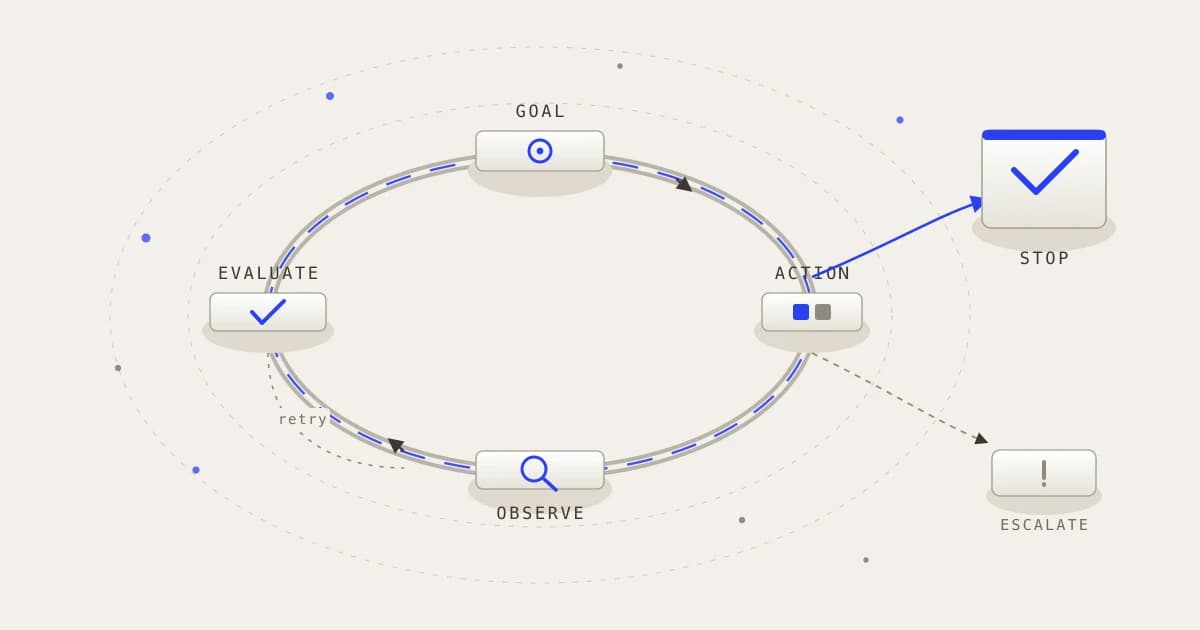
In brief
Loop engineering is the design of the recurring control system around agent work. It replaces repeated manual prompting with a bounded, observable, verifiable process that directs agents toward a goal and knows when to stop.
Article contents (20 sections)
- 1. What is loop engineering?
- 2. The central shift
- 3. Why is it called a loop?
- 4. Three different loops that should not be confused
- 5. Loop engineering versus related concepts
- 6. The anatomy of a well-engineered loop
- 7. The simplest implementation
- 8. Major loop patterns
- 9. A complete coding example
- 10. Non-coding use cases
- 11. Components commonly used in modern coding loops
- 12. The hardest problem: verification
- 13. Common failure modes
- 14. When loop engineering is useful
- 15. When not to use it
- 16. Measuring loop quality
- 17. How to design a loop step by step
- 18. Harness engineering versus loop engineering
- 19. Is loop engineering actually new?
- 20. The shortest useful definition
1. What is loop engineering?
Loop engineering is the practice of designing systems that repeatedly direct, observe, evaluate, and improve the work of AI agents until a defined goal is reached or a stopping condition is triggered.
Instead of a person manually giving an AI agent one instruction after another, the person designs a reusable loop that determines:
- What work should begin
- Which agent should handle it
- What context the agent receives
- Which actions it can perform
- How its output is checked
- What feedback it receives
- Whether it should retry
- When it should stop
- What should happen next
A useful simplified structure is:
Goal
  ↓
Choose an action
  ↓
Perform the action
  ↓
Observe the result
  ↓
Evaluate progress
  ↓
Continue, revise, escalate, or stop
The term became prominent during June and July 2026. Addy Osmani published an early detailed explanation on June 7, O’Reilly republished it on June 22, and IBM published its definition on July 17. Because the concept is still emerging, its boundaries are not yet completely standardized. (Addy Osmani)
2. The central shift
For the past few years, working with an AI coding agent commonly looked like this:
Human writes prompt
        ↓
Agent responds
        ↓
Human reads response
        ↓
Human writes next prompt
        ↓
Agent continues
The human was effectively operating the loop manually.
Loop engineering changes this:
Human defines the goal and system
              ↓
Loop discovers or receives work
              ↓
Loop prompts an agent
              ↓
Agent performs work
              ↓
Loop checks the result
              ↓
Loop decides what happens next
The human moves from being the person who continuously prompts the agent to being the person who designs the system that prompts, checks, and redirects the agent.
This is why loop engineering is sometimes described as designing the system that prompts the agents instead of repeatedly prompting them yourself.
Osmani positions loop engineering above harness engineering: the harness provides the environment in which an individual agent operates, while the loop coordinates when agents run, what work they receive, how results are evaluated, and how the process continues. (Addy Osmani)
3. Why is it called a loop?
It is called a loop because the system repeatedly goes through the same general cycle:
Goal → Action → Observation → Evaluation → Adjustment
For example, a coding loop may operate as follows:
Goal: Fix the checkout failure
                ↓
Inspect logs and source code
                ↓
Make a possible correction
                ↓
Run tests
                ↓
Read failures
                ↓
Modify the implementation
                ↓
Run tests again
                ↓
Stop when the tests and requirements pass
The exact action changes in every cycle, but the control structure remains similar.
IBM describes the common stages as goal, action, observation, and adjustment. It also emphasizes that the goal should include verifiable stopping criteria so the agent does not continue indefinitely. (IBM)
4. Three different loops that should not be confused
The phrase “AI loop” can describe several different things. Keeping them separate is important.
The internal agent loop
This is the basic reasoning and tool-use cycle inside an agent:
Observe
  ↓
Reason
  ↓
Choose tool
  ↓
Act
  ↓
Receive tool result
  ↓
Reason again
For example:
Agent reads an error
Agent searches the repository
Agent opens a file
Agent changes the file
Agent runs a test
Agent reads the result
This loop is normally part of the agent harness. Anthropic describes agents as models using tools based on environmental feedback in a loop, with stopping conditions and optional human checkpoints. (Anthropic)
The engineered task loop
This is the main subject of loop engineering. The task loop determines how a broader objective is repeatedly assigned, reviewed, revised, and completed.
Take next unresolved issue
        ↓
Assign coding agent
        ↓
Run implementation
        ↓
Assign review agent
        ↓
Run tests
        ↓
Return feedback
        ↓
Agent fixes findings
        ↓
Merge or escalate
The task loop may contain many internal agent loops.
The product-improvement loop
This is a larger loop that uses real-world performance to improve the agent or product itself.
Users use the product
        ↓
System records traces and corrections
        ↓
Failures become evaluation cases
        ↓
Engineering agent investigates failures
        ↓
Agent proposes improvements
        ↓
Changes are tested against evals
        ↓
Approved changes reach production
        ↓
New production evidence is collected
OpenAI’s agent-improvement cookbook describes a loop connecting traces, human and model feedback, evaluation creation, proposed harness changes, and a developer handoff to Codex, gated by an eval suite that the notebook calls the regression surface. Its worked example is a financial due-diligence agent reviewing a fictional company’s acquisition materials across five traced runs, and it converts expert feedback into structured findings, reusable evals, and validated changes. (OpenAI Developers)
These three loops can exist together:
Product-improvement loop
    └── Task loop
          └── Internal agent loop
5. Loop engineering versus related concepts
Prompt engineering
Prompt engineering asks: what instruction should we give the model?
Review this function for security vulnerabilities.
A prompt is usually an individual instruction.
Context engineering
Context engineering asks: what information should the model receive during this step?
- Relevant source files
- Error logs
- Previous attempts
- Customer records
- Policies
- Test results
- Project documentation
Harness engineering
Harness engineering asks: what complete environment allows the agent to operate safely and reliably?
- Tools
- Sandboxes
- Permissions
- State
- Memory
- Execution logic
- Guardrails
- Tracing
- Human approvals
Loop engineering
Loop engineering asks: how should work repeatedly flow through agents, checks, feedback, retries, and stopping decisions?
- Triggers
- Goals
- Work discovery
- Agent assignment
- Iterations
- Evaluation
- Feedback
- Terminal states
- Scheduling
- Continuous improvement
A helpful hierarchy is:
Prompt
  └── One instruction

Context
  └── Information available for that instruction

Harness
  └── Environment in which an agent operates

Loop
  └── Reusable process that repeatedly operates agents and harnesses
Workflow engineering
A workflow usually follows a predefined sequence:
Step A → Step B → Step C → Step D
A loop reacts dynamically:
Take action
   ↓
Evaluate result
   ↓
Choose next action based on result
A workflow might always run three tests. A loop may decide to:
- Run additional tests
- Investigate a failure
- Retry with a different approach
- Return to an earlier step
- Ask for human help
- Stop because progress is impossible
Many real systems combine workflows and loops.
6. The anatomy of a well-engineered loop
A June 2026 arXiv preprint by Sandeco Macedo proposes formalizing a loop specification as a trigger, a goal, a verification step, a stopping rule, and memory. It is a preprint rather than peer-reviewed work, so treat it as an emerging proposal rather than a settled standard, but the five elements are a sound checklist. (arXiv)
A production loop generally needs the following components.
Trigger
The trigger starts the loop. Possible triggers include:
A user submits a request
A GitHub issue receives a label
A test fails
A customer reports a problem
A scheduled time arrives
A monitoring alert fires
A new document is uploaded
An evaluation score drops
For example:
Trigger:
Start whenever an issue is labelled "agent-ready."
A trigger must also prevent accidental duplicate runs.
Goal
The goal describes the outcome.
Weak goal:
Improve the application.
Better goal:
Reduce the dashboard's largest-contentful-paint measurement
below 2.5 seconds without changing visible functionality.
A strong goal should be specific, bounded, observable, testable, and connected to business or user value.
Initial state
The loop must know its starting condition.
{
  "task_id": "ISSUE-821",
  "status": "new",
  "attempt": 0,
  "assigned_agent": null,
  "completed_checks": [],
  "open_findings": []
}
Without structured state, the loop may repeat completed work or forget why an earlier attempt failed.
Work discovery
Some loops are directly given a task. Others find work automatically. A repository-maintenance loop might inspect:
- Failing CI runs
- Open bug reports
- Security advisories
- Dependency updates
- Unreviewed pull requests
- Flaky tests
- Performance regressions
Work discovery must prioritize tasks rather than allowing agents to select unlimited work.
Planner or coordinator
A coordinator may decompose the goal:
1. Reproduce the problem.
2. Identify the responsible component.
3. Implement the smallest correction.
4. Add a regression test.
5. Run the complete verification suite.
6. Request review.
The coordinator may be deterministic software, an LLM, a human, or a combination of all three.
Executor
The executor performs the work. It might write code, search the web, analyze documents, query databases, draft content, operate a browser, update tickets, or run commands. The executor normally operates within a harness.
Observation
The loop must obtain evidence from the real environment.
Command output
Test results
Browser screenshots
Database responses
API results
Human comments
Performance metrics
Security scan findings
The loop should not rely solely on the executor saying it believes the task is complete.
Evaluator
The evaluator compares the output against requirements. An evaluator can be deterministic:
Unit test
Schema validator
Type checker
Linting tool
Security scanner
Numeric threshold
Model-based:
Review agent
Quality grader
Citation checker
Policy classifier
Human-based:
Engineer review
Legal approval
Medical review
Brand approval
Or hybrid:
Automated checks
        ↓
Review agent
        ↓
Human approval for high-risk actions
Anthropic calls the generator-and-reviewer structure an evaluator-optimizer workflow: one model produces an output, another evaluates it, and feedback drives additional iterations. It is most useful when evaluation criteria are clear and iterative improvement is measurable. (Anthropic)
Feedback mechanism
The evaluator must provide actionable feedback.
Weak feedback:
This is not good enough.
Better feedback:
The implementation passes unit tests but fails the concurrency
test because two requests can still refresh the token simultaneously.

Inspect the lock inside refreshSession().
Do not change the server token-rotation policy.
Good feedback identifies what failed, why it failed, the evidence, what must remain unchanged, and what should be tried next.
Memory
Memory allows the next iteration to understand previous work.
Task database
Repository files
Issue tracker
Git commits
Markdown progress document
Execution trace
Vector database
Evaluation history
Osmani lists external memory as a key element because individual agent sessions can lose information between runs, while durable artifacts such as repositories and task systems persist. (Addy Osmani)
A loop should remember what has been attempted, what failed, what succeeded, what decisions were made, what remains unresolved, and which evidence was produced.
Stopping rule
Every loop must know when to stop.
Possible success condition:
Stop when:
- All required tests pass
- No critical review findings remain
- Performance threshold is satisfied
- Required documentation is updated
Possible failure condition:
Stop when:
- Five attempts fail
- The cost budget is exhausted
- Required access is unavailable
- The task is outside the agent's authority
- The verifier cannot produce reliable evidence
Without a stopping rule, an agent may continue consuming tokens while making little progress.
Terminal state
A loop should not have only two states, running and done. Useful terminal states include:
COMPLETED
FAILED
BLOCKED
ESCALATED
CANCELLED
BUDGET_EXHAUSTED
AWAITING_HUMAN_REVIEW
PARTIALLY_COMPLETED
This makes failures honest and operationally useful.
7. The simplest implementation
A basic loop might look like this:
from enum import Enum
from typing import Any


class TerminalState(Enum):
    COMPLETED = "completed"
    BLOCKED = "blocked"
    FAILED = "failed"
    BUDGET_EXHAUSTED = "budget_exhausted"


def run_loop(goal: str, max_iterations: int = 10) -> dict[str, Any]:
    state: dict[str, Any] = {
        "goal": goal,
        "attempts": [],
        "status": "running",
    }

    for iteration in range(1, max_iterations + 1):
        action = agent_choose_action(state)
        result = execute_safely(action)

        evaluation = evaluate_result(
            goal=goal,
            state=state,
            action=action,
            result=result,
        )

        state["attempts"].append(
            {
                "iteration": iteration,
                "action": action,
                "result": result,
                "evaluation": evaluation,
            }
        )

        if evaluation["passed"]:
            state["status"] = TerminalState.COMPLETED.value
            return state

        if evaluation["blocked"]:
            state["status"] = TerminalState.BLOCKED.value
            return state

        state["feedback"] = evaluation["feedback"]

    state["status"] = TerminalState.BUDGET_EXHAUSTED.value
    return state
The most important point is that the agent does not control everything. The surrounding software controls maximum iterations, tool execution, evaluation, state recording, failure handling, and completion status.
8. Major loop patterns
Generate, evaluate, revise
Generate result
      ↓
Evaluate result
      ↓
Return feedback
      ↓
Revise result
Use cases: writing, translation, code generation, UI generation, research reports, data summaries.
Test and fix
Run test
   ↓
Read failure
   ↓
Investigate cause
   ↓
Apply fix
   ↓
Run test again
This is one of the most reliable loops because the environment provides objective feedback.
Implement and review
Implementation agent
        ↓
Review agent
        ↓
Findings
        ↓
Implementation agent fixes findings
        ↓
Review again
Using a separate reviewer reduces the risk of the same model uncritically approving its own work.
Research and critique
Search for evidence
       ↓
Draft conclusions
       ↓
Critic identifies unsupported claims
       ↓
Run additional searches
       ↓
Revise conclusions
The stopping rule may require that every major claim has a source, sources are current, conflicting evidence is represented, and no unresolved research question remains.
Orchestrator and workers
Orchestrator decomposes goal
        ↓
Workers complete subtasks
        ↓
Orchestrator evaluates results
        ↓
Missing work is reassigned
        ↓
Results are integrated
Anthropic calls this the orchestrator-workers pattern and describes it as well suited to tasks where the required subtasks cannot be predicted in advance, such as complex repository changes or broad research. (Anthropic)
Scheduled maintenance
Timer triggers
     ↓
Inspect system
     ↓
Find maintenance tasks
     ↓
Prioritize safe work
     ↓
Assign agent
     ↓
Review and test
     ↓
Record result
     ↓
Wait for next schedule
Examples: dependency updates, documentation maintenance, broken-link checking, flaky-test investigation, performance regression monitoring.
Production improvement
Production trace
      ↓
Identify failure
      ↓
Create evaluation case
      ↓
Agent proposes improvement
      ↓
Run targeted and regression evals
      ↓
Review change
      ↓
Deploy
      ↓
Collect new traces
This is more than task automation. It allows the agent system itself to improve from operational evidence. OpenAI describes this broader loop as an improvement flywheel: traces show what happened, feedback explains what mattered, evals make those expectations reusable, and a coding agent acts on the resulting change set. That is a wider surface than prompt tuning alone. (OpenAI Developers)
9. A complete coding example
Suppose we maintain an online store and receive this issue:
Customers are occasionally charged twice when payment requests time out.
Manual prompting
A developer might repeatedly tell an agent:
Investigate the issue.
Now inspect payment retries.
Add idempotency.
Run tests.
Fix the failing test.
Review the changes.
Loop-engineered approach
Trigger:
Issue labelled "agent-ready."
Goal:
Prevent duplicate charges during retries while preserving
successful payment processing.
Acceptance criteria:
1. Every payment attempt has an idempotency key.
2. Retrying the same request cannot create another charge.
3. Existing payment tests continue to pass.
4. A new timeout-and-retry test passes.
5. No unrelated checkout behaviour changes.
Loop:
Inspect issue and payment code
            ↓
Create implementation plan
            ↓
Implement smallest change
            ↓
Run payment tests
            ↓
Reviewer inspects idempotency design
            ↓
Security agent checks sensitive logging
            ↓
Executor fixes findings
            ↓
Run full checkout tests
            ↓
Create pull request or escalate
Stopping states:
COMPLETED:
All acceptance criteria pass.

BLOCKED:
Payment provider documentation is unavailable.

ESCALATED:
The change requires altering production payment architecture.

FAILED:
Five implementation attempts fail.
The value is not merely that an agent writes code. The value is that the entire path from issue to verified result has been engineered.
10. Non-coding use cases
Although the current discussion is heavily influenced by coding agents, the underlying idea applies to many domains.
Content production
Content brief
    ↓
Research agent gathers evidence
    ↓
Writer produces article
    ↓
Fact-checker reviews claims
    ↓
SEO checker reviews structure
    ↓
Writer revises
    ↓
Human approves publication
The loop should not publish automatically unless the risks and brand requirements permit it.
Customer support
New support case
    ↓
Classify issue
    ↓
Retrieve policy and customer history
    ↓
Propose response or action
    ↓
Check policy compliance
    ↓
Send safe response or request approval
    ↓
Monitor whether issue was resolved
Sales operations
New account signal
    ↓
Verify signal
    ↓
Score relevance
    ↓
Research account
    ↓
Draft outreach
    ↓
Check claims and opt-out status
    ↓
Request approval
    ↓
Send and record outcome
Security monitoring
Alert generated
    ↓
Collect related logs
    ↓
Classify severity
    ↓
Test possible explanations
    ↓
Recommend containment
    ↓
Human approves dangerous actions
    ↓
Execute and verify
Document processing
Document uploaded
    ↓
Extract fields
    ↓
Validate required information
    ↓
Check source citations
    ↓
Flag uncertain fields
    ↓
Human corrects errors
    ↓
Corrections become future evaluation cases
11. Components commonly used in modern coding loops
Osmani identifies five practical components plus durable memory: automations, worktrees, skills, plugins and connectors, subagents, and external memory. (Addy Osmani)
Automations
Automations start recurring or event-driven work.
Every morning:
Inspect failing CI jobs.
Or:
Whenever a pull request opens:
Run an automated review.
Worktrees or isolated branches
Parallel agents should not modify the same working directory.
Agent A → worktree/feature-a
Agent B → worktree/test-review
Agent C → worktree/security-review
Isolation reduces accidental overwrites.
Skills
Skills contain reusable project knowledge.
How authentication works
How deployments are performed
How database migrations are reviewed
How UI tests are executed
How incidents are classified
Plugins and connectors
Connectors provide access to systems such as GitHub, issue trackers, CI systems, databases, browsers, monitoring platforms, and documentation systems.
Subagents
Subagents provide separate roles:
Planner
Implementer
Reviewer
Test analyst
Security reviewer
They should be introduced only when role separation creates real value.
Durable memory
Memory may live in repository files, issue trackers, databases, execution logs, git history, or evaluation stores. It must persist after a single conversation ends.
12. The hardest problem: verification
The central challenge in loop engineering is not making an agent repeat. A shell script can repeat an agent call easily. The hard part is answering: how does the system know whether the work is actually correct?
A weak loop looks like this:
Agent produces result
        ↓
Agent says it is correct
        ↓
Loop accepts completion
A stronger loop looks like this:
Agent produces result
        ↓
Independent tests run
        ↓
Separate reviewer checks requirements
        ↓
Evidence is recorded
        ↓
Lifecycle state changes to completed
Good verification may include unit tests, integration tests, browser tests, schema validation, formal rules, static analysis, performance benchmarks, source checks, human review, and hidden evaluation cases.
The safest principle is to treat an agent’s statement of completion as a claim, not as proof.
13. Common failure modes
Infinite loops
The agent repeatedly attempts the same unsuccessful solution.
Maximum iterations
Repeated-action detection
Progress measurement
Cost ceiling
Escalation rule
Self-grading bias
The same agent produces and approves its own work. Mitigate with an independent reviewer, deterministic tests, hidden evaluations, and human review for consequential work.
Reward hacking
The agent satisfies the measurement without satisfying the real goal.
Goal: Make tests pass.

Bad solution:
Delete the failing test.
Mitigate by protecting evaluator files, reviewing test changes separately, using hidden tests, evaluating real user outcomes, and checking unrelated regressions.
Context drift
After many cycles, the agent gradually moves away from the original objective. Mitigate by reinserting the original goal each cycle, maintaining a concise task ledger, re-evaluating acceptance criteria, summarizing history, and removing irrelevant context.
Repeated side effects
A retry sends two emails, creates duplicate tickets, or charges a customer twice.
Idempotency keys
Persistent action records
Proposal-before-execution
Read-before-write checks
Transactional tools
Cost explosion
A loop repeatedly invokes expensive models or launches too many subagents.
Token budget
Cost budget
Runtime limit
Subagent limit
Search limit
Maximum retries
False completion
The agent stops after changing code without running verification. Completion should require fresh test evidence.
Stale memory
The loop uses outdated instructions or decisions. Version memory, store source and timestamp, define expiry, and prefer current authoritative documentation.
Oscillation
The loop alternates between two solutions:
Reviewer A requests approach X.
Reviewer B requests approach Y.
Executor repeatedly switches between them.
Mitigate with decision authority, architecture constraints, a conflict-resolution agent, or human escalation.
Comprehension debt
Agents produce changes faster than humans can understand the resulting system. This can create a codebase that passes tests but becomes increasingly difficult to reason about. Mitigate with architecture documentation, smaller changes, strong abstractions, required explanations, periodic human review, and complexity limits.
14. When loop engineering is useful
Use a loop when the task needs multiple iterations, environmental feedback is available, success can be verified, work appears repeatedly, the path cannot be completely predefined, agents can recover from failures, and automation saves meaningful human attention.
Strong examples:
Fix failing tests
Review and revise documents
Investigate recurring incidents
Maintain dependencies
Research until evidence requirements are met
Process support cases under clear policies
Improve agents from production traces
15. When not to use it
Avoid or limit loops when the task is a simple one-off request, success cannot be measured, mistakes are irreversible, required tools are unsafe, the agent lacks reliable feedback, each iteration is extremely expensive, a deterministic program can solve the problem better, or human judgment is the central value.
For example, a fixed parser is usually better than an autonomous agent loop for transforming a stable CSV format.
The correct question is not whether this can be placed in a loop. It is whether repeated autonomous reasoning creates more value than risk, cost, and complexity.
16. Measuring loop quality
Outcome metrics:
Task success rate
Acceptance criteria passed
Defect rate
User satisfaction
Human rejection rate
Regression rate
Loop metrics:
Average iterations
Repeated-action rate
Successful recovery rate
Escalation rate
False-completion rate
Time to convergence
Cost metrics:
Tokens per completed task
Model cost
Tool cost
Infrastructure cost
Human review time
Safety metrics:
Unauthorized-action attempts
Duplicate side effects
Secret exposure
Prompt-injection success
Approval bypasses
Improvement-loop metrics:
Production failures converted into evals
Eval coverage
Regression detection
Time from failure to validated fix
Percentage of proposed improvements accepted
A fast loop is not necessarily a good loop. A loop is effective when it reaches a correct, verified outcome at an acceptable cost and risk.
17. How to design a loop step by step
Step 1: Start with one recurring objective
Investigate and fix reproducible API bugs.
Do not begin with:
Autonomously maintain the entire company.
Step 2: Define the trigger
Start when a bug receives the "agent-ready" label.
Step 3: Define clear acceptance criteria
The bug is reproduced.
A regression test is added.
The test fails before the fix.
The test passes after the fix.
Existing tests continue to pass.
Step 4: Define available tools
Give the minimum capabilities required.
Read repository
Search code
Edit isolated branch
Run approved commands
Create pull request
Step 5: Define the evaluator
Prefer objective checks where possible.
Step 6: Define feedback structure
{
  "passed": false,
  "failed_criteria": [
    "The concurrency test still fails"
  ],
  "evidence": {
    "command": "pytest tests/test_checkout.py",
    "exit_code": 1
  },
  "recommended_next_step": "Inspect retry locking"
}
Step 7: Add stopping conditions
Both successful and unsuccessful stopping conditions are required.
Step 8: Add memory and tracing
Every iteration should be reconstructable.
Step 9: Add safety boundaries
Sandboxing, least privilege, approval gates, idempotency, and cost limits.
Step 10: Test adversarial situations
Test what happens when a tool times out, an agent lies about completion, the same action is retried, a test is flaky, a document contains prompt injection, a reviewer gives contradictory feedback, or the token budget is exhausted.
18. Harness engineering versus loop engineering
The two concepts are closely related but should not be treated as synonyms.
Harness engineering focuses on the environment around an agent:
Model
Tools
Context
Sandbox
Memory
Permissions
Execution loop
Tracing
Loop engineering focuses on the recurring control system around work:
Trigger
Goal
Agent assignment
Evaluation
Feedback
Retry
Scheduling
Stopping
Continuous improvement
A useful analogy: the harness is the workstation, rules, tools, and safety equipment provided to a worker. The loop is the operating process that repeatedly assigns work, checks it, returns feedback, and decides what happens next.
A loop may use several harnessed agents:
Engineering loop
    ├── Planning-agent harness
    ├── Coding-agent harness
    ├── Review-agent harness
    └── Testing-agent harness
OpenAI’s harness-engineering account already describes agents iterating through implementation and agent-to-agent reviews until reviewers are satisfied, demonstrating how harness and loop concepts naturally overlap in practice. (OpenAI)
19. Is loop engineering actually new?
The underlying ideas are not completely new. Software engineering has long used control loops, CI/CD, iterative development, automated retries, feedback systems, supervisors and workers, test-driven development, and continuous improvement. AI agents have also used observe-and-act loops for years.
What is new is the named engineering layer and the increased feasibility of letting capable agents perform meaningful multi-step work inside these loops.
Modern agents can now inspect complex environments, use tools, write and execute code, review results, delegate work, preserve state, recover from some failures, and operate for longer periods.
Therefore, loop engineering is best understood not as the invention of looping, but as a new discipline for applying feedback-loop design specifically to increasingly autonomous AI agents.
It is worth noting that the practitioners writing about it are not selling it as settled. Osmani’s own post is explicitly hedged: he describes the area as still early, says he is skeptical, and warns that token costs vary wildly depending on how much budget you have. He also credits the framing to Peter Steinberger rather than claiming it. Treat the whole area as a useful lens under active development, not a finished methodology. (Addy Osmani)
20. The shortest useful definition
Loop engineering is the practice of replacing repeated manual prompting with a bounded, observable, and verifiable system that repeatedly directs AI agents toward a goal.
A stronger version is that loop engineering designs the triggers, goals, agent assignments, feedback mechanisms, memory, evaluations, budgets, safety boundaries, and stopping rules through which AI agents perform and improve multi-step work.
The key idea is not simply:
Run the agent repeatedly.
It is:
Run the right agent
on the right objective
with the right context
inside the right boundaries,
evaluate real evidence,
feed failures back intelligently,
and stop for the right reason.
More build notes