Build note · Browser APIs
SpeechSynthesis: Crash Course
The browser's built-in text to speech, explained: speechSynthesis, utterances, voices, rate and pitch, the events you can rely on, and what the API cannot do.
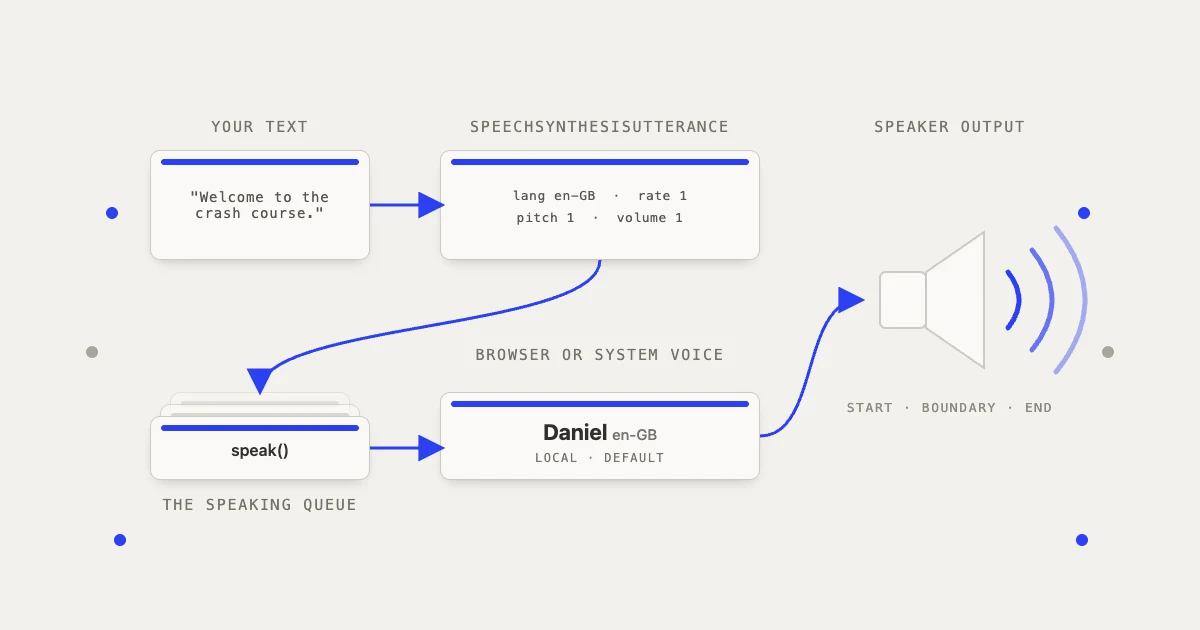
In brief
SpeechSynthesis is the text-to-speech half of the Web Speech API. It ships in every major browser, needs no key and no server, and this is the working set: the utterance, the global queue, voices and how they load, the events you can rely on, and the patterns that hold up in production.
Article contents (14 sections)
- 1. The mental model
- 2. Your first example
- 3. Configuring speech
- 4. Selecting a voice
- 5. Queue behaviour
- 6. Playback controls
- 7. Events
- 8. Highlighting text while speaking
- 9. Measured: what Chrome actually does
- 10. A reusable Promise wrapper
- 11. React/Next.js implementation
- 12. Long text
- 13. Important limitations
- 14. The production pattern
SpeechSynthesis is the browser’s built-in text-to-speech API. It converts text into spoken audio using voices installed or provided by the user’s browser or device. It needs no API key and no server.
It is the output side of the Web Speech API:
SpeechSynthesis: text to speechSpeechRecognition: speech to text
The API is still a draft community group report rather than a finished W3C standard, but it has shipped in every major browser for years (Chrome 33, Safari 7, Firefox 49, Edge 14), so it is safe to build on. The recognition side is patchier: Chrome, Edge and Safari have it (Safari, and Chrome before 139, only as webkitSpeechRecognition), and Firefox does not enable it by default.
1. The mental model
There are three main pieces:
speechSynthesis
The global controller:
window.speechSynthesis
It manages the speaking queue and exposes operations such as:
speechSynthesis.speak()
speechSynthesis.pause()
speechSynthesis.resume()
speechSynthesis.cancel()
speechSynthesis.getVoices()
SpeechSynthesisUtterance
An individual piece of text to speak:
const utterance = new SpeechSynthesisUtterance("Hello world");
It contains:
- Text
- Language
- Voice
- Speed
- Pitch
- Volume
- Lifecycle events
2. Your first example
<button id="speakButton">Speak</button>

<script>
  const button = document.getElementById("speakButton");

  button.addEventListener("click", () => {
    const utterance = new SpeechSynthesisUtterance(
      "Welcome to the Speech Synthesis crash course."
    );
    window.speechSynthesis.speak(utterance);
  });
</script>
Calling speak() adds the utterance to the browser’s global speaking queue.
Start speech from a user interaction, or nothing plays. Since Chrome 71, speak() on a page that has had no user activation does not throw: it fires an error event on the utterance with error set to not-allowed, and nothing is spoken. The gate is Chrome’s autoplay policy, which has exemptions (a site with a high media engagement score, an installed web app, an iframe granted autoplay), so a test that passes on your own machine proves little about a first-time visitor. On iOS, WebKit drops a gesture-less speak() silently, with no event at all, until the first speak() that runs synchronously inside a tap; after that one, later calls work. So make the first call from inside the tap handler, not after an await.
3. Configuring speech
const utterance = new SpeechSynthesisUtterance(
  "This sentence uses customized speech settings."
);

utterance.lang = "en-GB";
utterance.rate = 1;
utterance.pitch = 1;
utterance.volume = 1;

speechSynthesis.speak(utterance);
| Property | Range | Meaning |
|---|---|---|
text | String | Text that will be spoken |
lang | BCP 47 tag | Language, such as en-US |
voice | Voice object | Specific system/browser voice |
rate | 0.1 to 10 | Speaking speed |
pitch | 0 to 2 | Voice pitch |
volume | 0 to 1 | Output volume |
Normal defaults are:
utterance.rate = 1;
utterance.pitch = 1;
utterance.volume = 1;
Engines and individual voices may constrain rate and pitch further (the specification’s own example is a voice that will not go faster than three times normal however high you set rate), and extreme values sound unnatural. The ranges are defined by the Web Speech API specification.
The specification says an unset lang should inherit the document’s <html lang>. Firefox does that. Chrome ignores the document and falls back to the browser’s own locale, and Safari falls back to the system language. Three browsers, three different defaults, which is why every example here sets lang explicitly.
4. Selecting a voice
const voices = speechSynthesis.getVoices();

voices.forEach((voice) => {
  console.log({
    name: voice.name,
    language: voice.lang,
    default: voice.default,
    local: voice.localService,
  });
});
The specification allows default to be true for one voice per language, but implementations differ: Chrome flags only the first voice in its list (section 9 shows exactly one), Safari flags every system voice, Firefox one per language. Pick by lang, not by default. localService is false for voices synthesised over the network. Chrome desktop’s Google voices are in that group, and Edge’s “Online (Natural)” voices need a connection too, so read it at runtime before you promise anything works offline.
The available voice names vary by operating system, browser and installed language packs. So do not depend on an exact name such as "Samantha" or "Google UK English Female". On Chrome for Android the entries are locales rather than named voices, and voice.lang comes back with an underscore (en_US), so normalise before comparing:
const tag = (voice) => voice.lang.replace("_", "-");
Select an English voice, by language, with a fallback:
function speak(text) {
  const utterance = new SpeechSynthesisUtterance(text);
  const voices = speechSynthesis.getVoices();

  utterance.voice =
    voices.find((voice) => tag(voice) === "en-GB") ??
    voices.find((voice) => tag(voice).startsWith("en")) ??
    null;

  utterance.lang = utterance.voice ? tag(utterance.voice) : "en-GB";

  speechSynthesis.speak(utterance);
}
Setting lang to the chosen voice’s own language is deliberate. The specification requires a set voice to be used and only consults lang when voice is null, but it says nothing about what lang still does once a voice is set, so keep the two in agreement.
The asynchronous voice-list problem
In some browsers, this initially returns an empty array:
speechSynthesis.getVoices();
Voices may load asynchronously. Listen for voiceschanged:
function loadVoices() {
  const voices = speechSynthesis.getVoices();
  console.log(voices);
}

loadVoices();
speechSynthesis.addEventListener("voiceschanged", loadVoices);
Do both, in that order. Chrome fills the list from its browser process and fires voiceschanged afterwards, so the first synchronous call is empty (measured in section 9: 0 voices on the first call, 180 after the event). Safari built the list synchronously on the first call for years and only gained the voiceschanged event in Safari 16; since a WebKit change in early 2026 its first call can come back empty too, with the event following. Firefox does not start loading voices until something calls getVoices(). Calling first and listening second covers all three.
5. Queue behaviour
Every speak() call adds another utterance:
speechSynthesis.speak(
  new SpeechSynthesisUtterance("First message.")
);

speechSynthesis.speak(
  new SpeechSynthesisUtterance("Second message.")
);
The second message waits for the first one.
For buttons such as “Read this aloud,” users normally expect the new speech to replace the current speech:
function speak(text) {
  speechSynthesis.cancel();

  const utterance = new SpeechSynthesisUtterance(text);
  speechSynthesis.speak(utterance);
}
Two things to know about cancel(). The utterance being spoken does not get a normal end: Chrome fires error with interrupted, Safari fires error with canceled, and Firefox fires a plain end. And the utterances still waiting in the queue get no event at all in Chrome and Firefox (Safari 26 started firing canceled for each of them). Any code that waits for each utterance to finish has to settle itself when you cancel; section 10 does that.
Calling cancel() immediately before speak() worked throughout the section 9 run, and Chrome fixed the Windows bug behind the old advice to wait 500 ms in 2019 (Chromium issue 41436964). Safari had a bug of its own where the utterance queued right after cancel() could be dropped (WebKit bug 191745), fixed for Safari 27, so on the Safari people run today a stop-then-speak can still lose the new utterance.
6. Playback controls
speechSynthesis.pause();
speechSynthesis.resume();
speechSynthesis.cancel();
What they do:
pause()pauses the global speech queue.resume()continues from the paused position.cancel()stops the current utterance and clears queued utterances.
You can inspect the current state:
console.log(speechSynthesis.speaking);
console.log(speechSynthesis.paused);
console.log(speechSynthesis.pending);
These are read-only booleans. speaking stays true while paused. pending is true only for utterances that have not started yet, not for the one being spoken.
The paused state has a trap, and the engines disagree about it:
- The specification says
cancel()does not change the paused state andpause()works while idle, sopause()thencancel()leaves the nextspeak()silent untilresume(). Firefox does exactly that. - Chrome clears its paused flag inside
cancel(), so that sequence plays. Its trap ispause()while idle followed byspeak(): the utterance is held,pausedstill readsfalse,speakingreadstrue, andresume()releases it (measured in section 9). - Safari ignores
pause()while nothing is speaking. - On Android,
pause()stops the audio with no event and leavesspeakingtrue until you callcancel().
Keep your own paused flag rather than trusting the browser’s, and reset with cancel() followed by resume(): Firefox needs the resume(), Chrome ignores it, and neither is harmed.
7. Events
const utterance = new SpeechSynthesisUtterance(
  "Speech synthesis supports several useful events."
);

utterance.onstart = () => {
  console.log("Speech started");
};

utterance.onend = () => {
  console.log("Speech completed");
};

utterance.onpause = () => {
  console.log("Speech paused");
};

utterance.onresume = () => {
  console.log("Speech resumed");
};

utterance.onerror = (event) => {
  console.error("Speech failed:", event.error);
};

speechSynthesis.speak(utterance);
Important events include:
startenderrorpauseresumeboundarymark(defined by the specification; no shipping browser fires it)
end and error are mutually exclusive: one utterance gets one of them, never both. Completion logic has to listen to both, or a cancellation leaves it waiting forever.
The error codes the specification defines are canceled, interrupted, audio-busy, audio-hardware, network, synthesis-unavailable, synthesis-failed, language-unavailable, voice-unavailable, text-too-long, invalid-argument and not-allowed. By the specification’s definitions two of them are normal outcomes rather than failures: canceled (removed from the queue before it started) and interrupted (stopped after it started). Browsers use them loosely. Chrome only ever reports four (not-allowed, interrupted, canceled and synthesis-failed, with every other failure collapsed into the last one). Safari reports canceled for the utterance that was speaking as well as for the queued ones. Firefox reports a cancellation as a plain end, and fires error only for real failures, with event.error left undefined. So: treat canceled and interrupted as cancellation, and everything else, a missing code included, as a real failure.
8. Highlighting text while speaking
The boundary event may fire when the engine reaches a word or sentence:
const text = "Speech synthesis can highlight the current word.";
const utterance = new SpeechSynthesisUtterance(text);

utterance.onboundary = (event) => {
  console.log({
    boundary: event.name,
    start: event.charIndex,
    length: event.charLength,
    currentText: text.slice(
      event.charIndex,
      event.charIndex + event.charLength
    ),
  });
};

speechSynthesis.speak(utterance);
However, engines are not required to provide precise boundary information. Some browsers or voices may:
- Not fire
boundary - Return
charLengthas0 - Report approximate positions
Where it stands today, from the browser sources:
| Browser and platform | Word boundaries | Sentence boundaries |
|---|---|---|
| Chrome, macOS | Yes, with charLength | No |
| Chrome, Windows | Yes | Yes, charLength always 0 |
| Chrome, Linux and Android | No | No |
| Chrome, Google network voices | No | No |
| Safari | Yes, with charLength | No |
| Firefox, Windows | Yes | Yes |
| Firefox, macOS and Android | Yes | No |
| Firefox, Linux | No | No |
One more difference: the specification defines elapsedTime in seconds, and Firefox and Safari report seconds, but Chrome still reports milliseconds (early drafts said milliseconds, which is where its value comes from). Divide Chrome’s number by 1000.
Treat word highlighting as an extra that nothing depends on. The specification describes these limitations for charIndex and charLength.
9. Measured: what Chrome actually does
Sections 1 to 8 are what the specification, MDN’s compatibility data, the browser sources and the bug trackers say. This is what one real browser did: Google Chrome 152 on macOS, driven headless by a Puppeteer script on the machine this site is built on, with the results read straight off the events.
| Check | Result |
|---|---|
getVoices() on first call | 0 voices |
getVoices() after voiceschanged | 180 voices in 49 languages, 119 ms after the first call. All localService: true: the automation disables Chrome’s component extensions, which is where its Google network voices live |
voiceURI | Identical to name for all 180, so it is not a unique key |
default | One voice flagged, Albert (en-US). Chrome flags only the first entry in its list, never one per language |
start after speak() | 50 ms |
boundary on a 61-character sentence (Daniel, en-GB) | 9 word boundaries, every charLength correct (Hello at 0 for 5, world. at 6 for 6), no sentence boundaries |
elapsedTime on end | 4467 for a 4.5 second utterance, so milliseconds |
Three queued, cancel() after 1.5 s | Events seen: 0:start, 0:error:interrupted. Utterances 1 and 2 fired nothing |
pending with two waiting | true |
pause() while idle, then speak() | paused reads false, the utterance does not start, speaking reads true; resume() releases it and start fires |
| A 1,614-character utterance, local voice | start at 15 ms, 294 word boundaries, end at 90.2 s with elapsedTime 90221. No cutoff on a local voice |
The two rows that decide your architecture are the cancel row (queued utterances vanish without an event) and the pause row (the flags lie). Both are handled in the code that follows. The last row is why section 12 blames the network voices, not the API, for the long-text cutoff: this run had no Google network voice to measure, so that part rests on the Chromium bug tracker rather than on this table.
10. A reusable Promise wrapper
The native API is event-based. Wrap it in a Promise, as long as the Promise settles on every path: end, a real error, a cancellation you caused, and the case where no event ever arrives (Chrome has an open bug where end is sometimes never dispatched, and queued utterances get nothing on cancel()).
const inFlight = new Map();

function speak(text, options = {}) {
  return new Promise((resolve, reject) => {
    if (typeof window === "undefined" || !("speechSynthesis" in window)) {
      reject(new Error("Speech synthesis is not supported"));
      return;
    }

    const clean = String(text ?? "").replace(/\s+/g, " ").trim();
    if (!clean) {
      resolve("empty");
      return;
    }

    const utterance = new SpeechSynthesisUtterance(clean);

    utterance.lang = options.lang ?? "en-GB";
    utterance.rate = options.rate ?? 1;
    utterance.pitch = options.pitch ?? 1;
    utterance.volume = options.volume ?? 1;

    if (options.voice) {
      utterance.voice = options.voice;
      utterance.lang = options.voice.lang;
    }

    let settled = false;
    let watchdog;
    const settle = (outcome, failure) => {
      if (settled) return;
      settled = true;
      clearTimeout(watchdog);
      inFlight.delete(utterance);
      if (failure) reject(failure);
      else resolve(outcome);
    };

    // Armed on start, not on speak(): a chunk deep in a long queue can wait
    // longer than its own speaking time. Generous: about 150 ms per character.
    utterance.onstart = () => {
      watchdog = setTimeout(
        () => settle("timeout"),
        5000 + (clean.length * 150) / (utterance.rate || 1)
      );
    };
    utterance.onend = () => settle("ended");
    utterance.onerror = (event) => {
      const code = event.error;
      // canceled and interrupted are cancellations, not failures. Firefox
      // reports a cancellation as end and leaves the code empty on real errors.
      if (code === "canceled" || code === "interrupted") {
        settle("cancelled");
        return;
      }
      settle(null, new Error(`Speech failed: ${code ?? "unknown"}`));
    };

    // The map keeps a reference the engine cannot lose, and stop() reads it.
    inFlight.set(utterance, settle);
    speechSynthesis.speak(utterance);
  });
}

function stop() {
  speechSynthesis.cancel();
  speechSynthesis.resume();
  // Queued utterances get no event on cancel() in Chrome and Firefox.
  for (const settle of inFlight.values()) settle("cancelled");
}
Usage:
async function announce() {
  try {
    const outcome = await speak("Your payment was successful.", {
      lang: "en-GB",
      rate: 0.95,
    });
    console.log(outcome); // "ended", "cancelled", "timeout" or "empty"
  } catch (error) {
    console.error(error); // not-allowed, synthesis-failed, network ...
  }
}
The wrapper resolves rather than rejects on canceled and interrupted, because the specification defines those as the normal result of cancel() (Firefox reports the same thing as a plain end, which lands in onend). stop() settles every promise still in flight itself, because in Chrome and Firefox the utterances that had not started never get an event (Safari fires canceled for them, which the same handler absorbs). stop() calls resume() after cancel() because Firefox keeps the paused state across a cancel while Chrome clears it and ignores the extra call, so the pair is a safe reset everywhere. And the watchdog is armed on start rather than when the utterance is queued, so a chunk waiting behind a long queue is not timed out for waiting; an utterance that never starts is settled by stop().
11. React/Next.js implementation
Speech synthesis is a browser API. It does not exist during Next.js server rendering, and a "use client" component is still rendered on the server on the first load, so speechSynthesis is only touched inside the effect and the event handlers, never during render.
"use client";

import { useEffect, useRef, useState } from "react";

const tag = (voice: SpeechSynthesisVoice) => voice.lang.replace("_", "-");

export default function SpeechPlayer() {
  const [supported, setSupported] = useState(false);
  const [voices, setVoices] = useState<SpeechSynthesisVoice[]>([]);
  const [speaking, setSpeaking] = useState(false);
  const utteranceRef = useRef<SpeechSynthesisUtterance | null>(null);

  useEffect(() => {
    if (!("speechSynthesis" in window)) return;
    setSupported(true);

    const loadVoices = () => {
      setVoices(window.speechSynthesis.getVoices());
    };

    loadVoices();
    window.speechSynthesis.addEventListener(
      "voiceschanged",
      loadVoices
    );

    return () => {
      window.speechSynthesis.cancel();
      window.speechSynthesis.removeEventListener(
        "voiceschanged",
        loadVoices
      );
    };
  }, []);

  function handleSpeak() {
    if (!supported) return;
    window.speechSynthesis.cancel();
    window.speechSynthesis.resume();

    const utterance = new SpeechSynthesisUtterance(
      "This text is being spoken from a React component."
    );

    utterance.voice =
      voices.find((voice) => tag(voice) === "en-GB") ??
      voices.find((voice) => tag(voice).startsWith("en")) ??
      null;
    utterance.lang = utterance.voice ? tag(utterance.voice) : "en-GB";

    utterance.rate = 1;
    utterance.pitch = 1;

    utterance.onstart = () => setSpeaking(true);
    utterance.onend = () => setSpeaking(false);
    utterance.onerror = () => setSpeaking(false);

    utteranceRef.current = utterance;
    window.speechSynthesis.speak(utterance);
  }

  function handleStop() {
    if (!supported) return;
    window.speechSynthesis.cancel();
    window.speechSynthesis.resume();
    setSpeaking(false);
  }

  return (
    <div>
      <button onClick={handleSpeak} disabled={!supported || speaking}>
        Speak
      </button>
      <button onClick={handleStop} disabled={!supported}>
        Stop
      </button>
    </div>
  );
}
The cleanup calls cancel() because speech is global to the window and would carry on after the component unmounted. React’s development-only double run of effects happens at mount, before any click has called speak(), so it cancels an empty queue; the same cleanup also runs on every Fast Refresh, so expect speech to stop when you save the file. The cancel ends whatever was speaking with error (interrupted in Chrome, canceled in Safari) or with end (Firefox), which is why both handlers set speaking back to false. The ref keeps the utterance referenced while it speaks, cheap insurance against lost events.
12. Long text
Long utterances are where the API is least reliable. The specification says the text may be limited to 32,767 characters, with a text-too-long error, but the failure you will actually meet is in Chrome: with a Google network voice, speech stops abruptly after roughly 15 seconds (Chromium issue 41294170, open since 2017). Reports on the tracker put the cutoff at about 15 seconds of audio rather than a character count, and a separate open issue (40736855) has the same voices clipping at about 4,000 characters, so short chunks avoid both. Keep each utterance short and let the queue do the rest.
Split by sentence. The obvious regular expression breaks on e.g. and 3.5. Intl.Segmenter handles decimals and an abbreviation followed by a lowercase word; it still splits after Dr. when a capitalised name follows, which is harmless here because the chunker below joins short neighbours back together. It has been in Chrome since 87, Safari since 14.1 and Firefox since 125, so fall back to the regular expression only where it is missing:
function sentences(text) {
  if (typeof Intl !== "undefined" && "Segmenter" in Intl) {
    const segmenter = new Intl.Segmenter("en", { granularity: "sentence" });
    return [...segmenter.segment(text)].map((s) => s.segment);
  }
  return text.match(/[^.!?]+[.!?]+|[^.!?]+$/g) ?? [];
}

function splitText(text, maximumLength = 180) {
  const chunks = [];
  let current = "";

  for (const sentence of sentences(text)) {
    const clean = sentence.replace(/\s+/g, " ").trim();
    if (!clean) continue;

    if (clean.length > maximumLength) {
      // One sentence longer than the limit: break it on words.
      if (current) chunks.push(current);
      current = "";
      for (const word of clean.split(" ")) {
        if (`${current} ${word}`.trim().length > maximumLength) {
          if (current) chunks.push(current);
          current = word;
        } else {
          current = `${current} ${word}`.trim();
        }
      }
      continue;
    }

    if (`${current} ${clean}`.trim().length > maximumLength) {
      chunks.push(current);
      current = clean;
    } else {
      current = `${current} ${clean}`.trim();
    }
  }

  if (current) chunks.push(current);
  return chunks;
}
Compared with a plain split on full stops, it never emits a whitespace-only chunk (an empty utterance once wedged Chrome’s Google voices on every platform until cancel() or a restart, Chromium issue 40764956, fixed in Chrome 92; skipping empty chunks is still the right hygiene), and a single sentence longer than the limit is broken on words instead of passed through whole.
Queue the chunks:
// Kept referenced so a queued utterance cannot be collected and lose its events.
const spoken = [];

function speakArticle(text, onProgress = () => {}) {
  speechSynthesis.cancel();
  speechSynthesis.resume();
  spoken.length = 0;

  const chunks = splitText(text);
  chunks.forEach((chunk, index) => {
    const utterance = new SpeechSynthesisUtterance(chunk);
    utterance.lang = "en-GB";
    utterance.onstart = () => onProgress(index + 1, chunks.length);
    spoken.push(utterance);
    speechSynthesis.speak(utterance);
  });
}
Queueing everything at once is how the specification intends the API to be used: each chunk fires its own start, which is where the progress comes from, and one cancel() clears the lot. What it does not give you, in Chrome and Firefox, is an event for the chunks that never started (Safari 26 fires canceled for each), so a progress bar is reset by your own stop function rather than by waiting for end. The alternative, queueing the next chunk inside onend, gives finer control over failures and pays a small latency per hop (about 50 ms to start in the run above), but one lost end event silently ends the whole read. The code above queues everything and leaves the reset to stop().
13. Important limitations
What the browser does not promise:
- Different devices have different voices.
- The same voice may sound different across platforms.
- Some voices depend on network services:
localServicetells you which. - Boundary events are inconsistent.
- Exact audio duration is unknown in advance.
- The API sends sound to the speaker. It does not return an MP3, WAV,
Blobor audio stream, and there is no supported way to capture what it plays. - You cannot guarantee a specific branded voice.
- Browser navigation, tab suspension and mobile power management can interrupt speech. Chrome desktop keeps speaking in a background tab, but stops on navigation. Chrome on Android refuses
speak()and cancels everything once the app is backgrounded or the screen locks. iOS Safari has stopped speech when the page is backgrounded, and whether the queued utterances get an error event depends on the Safari version, so do not rely on one. - On Android,
pause()stops the audio with no event and leavesspeakingtrue untilcancel().
Use browser SpeechSynthesis for:
- Accessibility helpers
- Reading articles aloud
- Pronunciation buttons
- Notifications
- Prototypes
- Simple voice interfaces
Use a server or cloud text-to-speech service when you need:
- Downloadable audio
- Consistent voices
- High-quality neural speech
- Voice cloning
- Exact timing
- Audio post-processing
- Reliable production narration
14. The production pattern
A solid implementation usually follows this flow:
const supported =
  typeof window !== "undefined" && "speechSynthesis" in window;

// Voices, loaded once at start-up and refreshed when the browser says so.
let voices = [];
const loadVoices = () => {
  voices = window.speechSynthesis.getVoices();
};
if (supported) {
  loadVoices();
  window.speechSynthesis.addEventListener("voiceschanged", loadVoices);
}

const tag = (voice) => voice.lang.replace("_", "-");
let keep = null;

function speakSafely(text) {
  if (!supported) return;

  const clean = String(text ?? "").replace(/\s+/g, " ").trim();
  if (!clean) return;

  const synthesis = window.speechSynthesis;
  synthesis.cancel();
  synthesis.resume();

  const utterance = new SpeechSynthesisUtterance(clean);

  utterance.voice =
    voices.find((voice) => tag(voice) === "en-GB") ??
    voices.find((voice) => tag(voice).startsWith("en")) ??
    null;
  utterance.lang = utterance.voice ? tag(utterance.voice) : "en-GB";
  utterance.rate = 1;
  utterance.pitch = 1;
  utterance.volume = 1;

  const release = () => {
    if (keep === utterance) keep = null;
  };
  utterance.onend = release;
  utterance.onerror = (event) => {
    release();
    const code = event.error;
    if (code === "canceled" || code === "interrupted") return;
    if (code === "not-allowed") {
      // Chrome's signal. iOS drops a gesture-less speak() with no event at all.
      console.warn("Speech needs a user gesture on this page first.");
      return;
    }
    console.error("Speech synthesis error:", code ?? "unknown");
  };

  keep = utterance;
  synthesis.speak(utterance);
}
The core idea to remember is:
const utterance = new SpeechSynthesisUtterance(text);
speechSynthesis.speak(utterance);
Everything else (voice selection, controls, events, queues and React state) is built around those two lines.
If you need the other direction, speech to text, that is a job for a server rather than the browser: this site’s Video to Text and Subtitle Generator run a self-hosted speech model for exactly that reason. This site does not ship text to speech today.
More build notes