Build note · Cloud
AWS EC2: Crash Course
A practical crash course in AWS EC2 for backend engineers: instances, AMIs, EBS, security groups, VPCs, subnets, load balancers, and the architecture you should be able to draw in an interview.
In brief
EC2 gives you a virtual server in AWS to run your application on. This is the working set of concepts around it, from AMIs and security groups up to VPCs, load balancers and auto scaling, with the diagrams to hold them together.
Article contents (23 sections)
- 1. What is EC2?
- 2. What is an EC2 Instance?
- 3. AMI
- 4. Instance Type
- 5. EBS
- 6. Security Groups 🔐
- 7. Public IP vs Private IP
- 8. Elastic IP
- 9. SSH
- 10. Key Pair 🔑
- 11. VPC
- 12. Subnet
- 13. Internet Gateway
- 14. Route Table
- 15. Nginx + EC2
- 16. EC2 + Docker
- 17. EC2 vs S3
- 18. EC2 vs Lambda
- 19. Scaling EC2
- 20. Load Balancer
- 21. A Typical Real-World Architecture
- 22. The EC2 Things You MUST Know
- The mental model 🧠
1. What is EC2?
EC2 = Elastic Compute Cloud.
Simply:
EC2 gives you a virtual server in AWS that you can use to run your application.
Think of it like renting a computer in the cloud.
Instead of:
Your MacBook → run Node.js/Django
you can have:
You choose how powerful the server is and pay for what you use.
2. What is an EC2 Instance?
An instance = your virtual machine/server.
For example:
You can SSH into it:
ssh ubuntu@YOUR_IP
Then it feels almost exactly like using a Linux server.
3. AMI
When creating an EC2 instance, AWS asks you to choose an AMI.
AMI = Amazon Machine Image
Think:
AMI = starting template for your server.
Examples:
Ubuntu 24.04
Amazon Linux
Windows Server
If you choose Ubuntu, AWS creates an Ubuntu server for you.
4. Instance Type
This determines how powerful your server is.
Example:
t3.micro
or
t3.medium
An instance type controls things like:
- CPU
- RAM
- network performance
- sometimes specialised hardware
Think of it like choosing a laptop:
t3.micro     → small laptop
t3.medium    → decent laptop
m7i.large    → more powerful machine
g5.xlarge    → GPU machine
5. EBS
Your EC2 instance needs storage.
AWS commonly uses EBS (Elastic Block Store).
Think:
EBS = hard drive/SSD attached to your EC2 server.
For example:
Your application, files and operating system can live on it.
Important distinction:
EC2 = computer EBS = disk
6. Security Groups 🔐
This is very important for interviews.
A Security Group controls incoming and outgoing network traffic for your EC2 instance.
For example:
Security Group
SSH       22    → your IP
HTTP      80    → everyone
HTTPS     443   → everyone
Node      3000  → nobody
So if your Django app runs:
localhost:8000
but port 8000 isn’t allowed by the Security Group, the internet can’t reach it.
Example
You deploy:
Django → port 8000
You need something like:
Inbound Rules
80    HTTP     0.0.0.0/0
443   HTTPS    0.0.0.0/0
22    SSH      YOUR_IP
Usually you don’t expose 8000 publicly.
Instead:
7. Public IP vs Private IP
An EC2 instance can have:
Public IP
Used to communicate with the server from the internet.
Example:
18.170.xx.xx
Private IP
Used inside the AWS network.
Example:
10.0.2.15
8. Elastic IP
Here’s an annoying AWS detail.
A normal public IP can change when you stop/start an EC2 instance.
An Elastic IP is a static public IPv4 address.
So:
Your server’s public address stays consistent.
9. SSH
You normally connect to a Linux EC2 instance using SSH.
AWS gives you a key pair:
my-server.pem
Then:
chmod 400 my-server.pem
ssh -i my-server.pem ubuntu@18.xxx.xxx.xxx
Now you’re inside the server.
10. Key Pair 🔑
The .pem file is your private SSH key.
Conceptually:
EC2 has the corresponding public key.
Never commit your .pem file to GitHub.
11. VPC
This one sounds complicated but isn’t.
VPC = Virtual Private Cloud
It’s basically:
Your private network inside AWS.
Example:
You control things like:
- IP ranges
- subnets
- routing
- internet access
12. Subnet
A subnet is a range of IP addresses that belong to the same network.
For example:
VPC
10.0.0.0/16
You can divide that network into smaller ranges:
Subnet A: 10.0.1.0/24
Subnet B: 10.0.2.0/24
Each subnet contains a set of possible IP addresses.
So if your EC2 gets:
10.0.1.25
it’s inside Subnet A.
If another EC2 gets:
10.0.2.30
it’s inside Subnet B.
Why divide a network?
Because you may want different groups of machines to be separated and controlled differently.
For example:
So the core definition is:
A subnet is a smaller IP-address range carved out of a larger network.
That’s really what “subnet” means. The public/private distinction comes after understanding this.
Public and private subnets
Once you have the ranges, you separate them by what should be reachable:
- Public subnet → resources that need to be reachable from the internet, e.g. a web server.
- Private subnet → resources you don’t want directly exposed, e.g. a database.
And importantly, a subnet is associated with one Availability Zone.
13. Internet Gateway
A VPC needs a way to communicate with the internet.
That’s what an Internet Gateway (IGW) does.
Think:
14. Route Table
A route table tells AWS:
“Where should network traffic go?”
Example:
Destination       Target
10.0.0.0/16       local
0.0.0.0/0         Internet Gateway
0.0.0.0/0 basically means:
Anywhere else / the internet.
15. Nginx + EC2
A very common deployment looks like this:
Nginx acts as a reverse proxy.
The user doesn’t directly access:
example.com:8000
Instead:
16. EC2 + Docker
You can also run Docker on EC2.
For example:
This is very common.
Your deployment might be:
git pull
docker compose down
docker compose up -d --build
17. EC2 vs S3
Very common interview question.
EC2
Compute
Run application
Run server
Run Docker
Run Python
Run Node
S3
Object storage
Images
Videos
PDFs
Backups
Static files
Think:
EC2 = computer S3 = storage bucket
18. EC2 vs Lambda
Another common interview question.
EC2
You manage the server:
You worry about:
- OS updates
- server configuration
- scaling
- processes
Lambda
AWS manages the servers.
You basically provide:
Function
and AWS runs it when needed.
So:
EC2 → more control Lambda → less infrastructure management
19. Scaling EC2
Suppose your website becomes popular.
One EC2:
Users
 ↓
EC2
Eventually it can’t handle the traffic.
You can have:
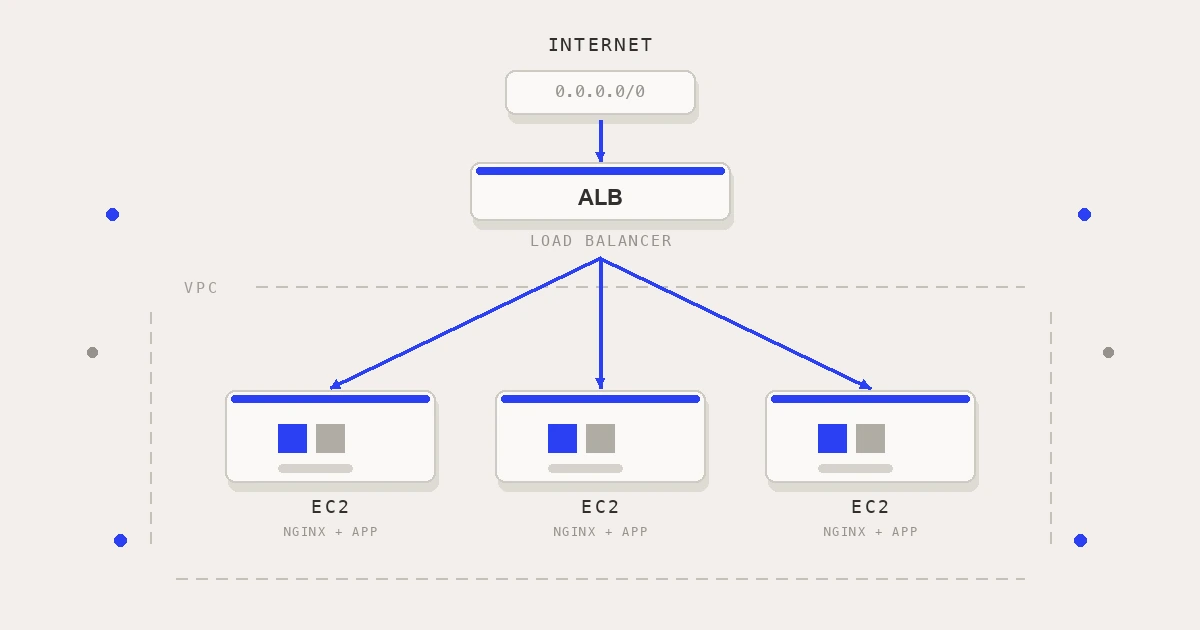
             Load Balancer
             /     |     \
            ↓      ↓      ↓
          EC2     EC2    EC2
This is where Auto Scaling Groups come in.
AWS can automatically:
Traffic increases
       ↓
Create more EC2 instances
Then:
Traffic decreases
       ↓
Remove instances
20. Load Balancer
AWS ALB (Application Load Balancer) can distribute requests.
For example:
Request 1 → EC2 #1
Request 2 → EC2 #2
Request 3 → EC2 #3
This gives you better scalability and availability.
21. A Typical Real-World Architecture
For a Django/React application, you might have:
This is the kind of architecture you should be able to explain in an interview.
22. The EC2 Things You MUST Know
If you’re preparing for an interview, remember these:
| Concept | Simple meaning |
|---|---|
| EC2 | Virtual server |
| Instance | One EC2 server |
| AMI | Server template/image |
| Instance type | CPU/RAM configuration |
| EBS | Disk/storage for EC2 |
| Security Group | Firewall |
| Key Pair | SSH authentication |
| Public IP | Internet-facing IP |
| Elastic IP | Static public IP |
| VPC | Private AWS network |
| Subnet | Network inside VPC |
| Internet Gateway | VPC ↔ Internet |
| Route Table | Controls network routes |
| ALB | Distributes traffic |
| Auto Scaling | Automatically adds/removes EC2s |
The mental model 🧠
If you remember only one diagram, remember this:
And traffic:
That’s EC2 in a nutshell.
If you’re learning AWS for a Full Stack/AI interview, the next things I’d learn after EC2 are S3 → RDS → VPC → IAM → ALB → Auto Scaling → CloudWatch → ECS, in roughly that order.
More build notes