Every guide, filed by tool.
Guides for the jobs these tools do, written and checked against the live tool by the person who builds them.
20 guides · 7 tasks · updated 18 September 2026
Build notes
SpeechSynthesis: Crash Course
SpeechSynthesis is the text-to-speech half of the Web Speech API. It ships in every major browser, needs no key and no server, and this is the working set: the utterance, the global queue, voices and how they load, the events you can rely on, and the patterns that hold up in production.
Browser APIs · 16 min read
Every build note →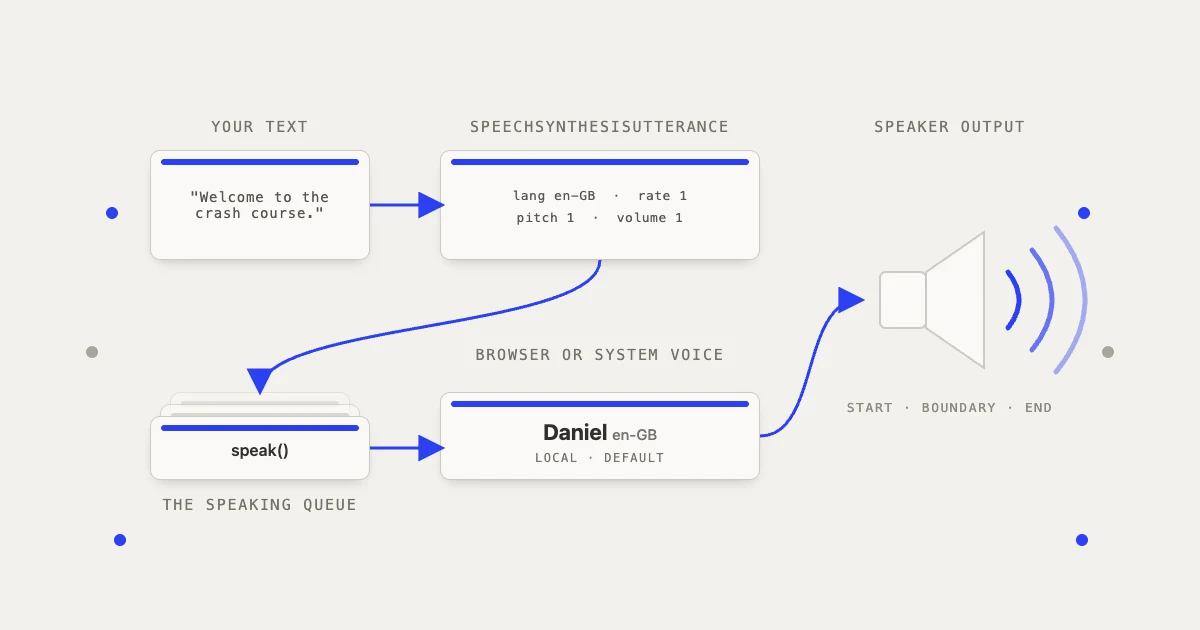
Start here
How to password protect a PDF properly
Open Protect PDF, type the password twice, and download the encrypted copy. It uses AES-256, which current Acrobat, Preview, and major browser viewers support. Its practical strength depends on the password you choose.
Why this one
Encryption is easy to add and easy to misunderstand, and the misunderstanding is the expensive part.
Main guide · protect-pdf · 5 min read
Recently added
- Is it safe to remove a PDF password online?It depends on the document, not on the tool's promises.18 Sept 2026
- How do I compress a PDF to 500KB?Open Compress PDF, choose Smaller file, download the result, and check its size against 500 KB.14 Sept 2026
- Should I send this as a PDF or a Word file?Send a PDF when the document has to look the same for everyone, and work in Word while it still has to be rewritten.13 Sept 2026
- How do I remove the password from a PDF?Open Unlock PDF, add the file, type the password you already know, and download the unlocked copy.4 Sept 2026
- How do I get the text out of a scanned PDF?Run the file through OCR a PDF first.1 Sept 2026
- How do I convert a PDF to Word without losing the formatting?Open PDF to Word, upload one PDF, and download the .docx.29 Aug 2026
- How do I make a scanned PDF searchable?Upload the scan to OCR PDF, choose the language the document is written in, run the job, and download searchable.pdf.17 Aug 2026
- Why can't I search or copy the text in my scanned PDF?Because the pages are images, not text.11 Aug 2026
- What is the difference between splitting and extracting PDF pages?Extracting pulls selected pages out into one new PDF.5 Aug 2026
- How do I get just one page out of a PDF?Open Split PDF, upload the document, and type the page number on its own, such as 7.4 Aug 2026
- How do I change text that is already in a PDF?Open Edit PDF, upload your file, choose Edit text, and click the line you want to change.4 Aug 2026
- Why is my PDF so big?A PDF is usually large because it contains scanned pages, high-resolution photographs, or other image-heavy content.3 Aug 2026
PDF /7
Merge, split, convert, compress. The whole paperwork drawer.
- Merge PDFsHow do I combine several PDFs into one file?4 guides4 guides
- Split and extract PDF pagesHow do I split a PDF into separate pages?3 guides3 guides
- Compress PDFsHow do I get my PDF under a 1 MB upload limit?4 guides4 guides
- Edit text and fill PDFsHow do I change text that is already in a PDF?1 guide1 guide
- Make scanned PDFs searchableHow do I make a scanned PDF searchable?3 guides3 guides
- Convert PDFs to WordHow do I convert a PDF to Word without losing the formatting?2 guides2 guides
- Password protect and unlock PDFsHow do I put a password on a PDF?3 guides3 guides