Main guide · Edit PDF
How to edit text in a PDF for free
Short answer
In this guide
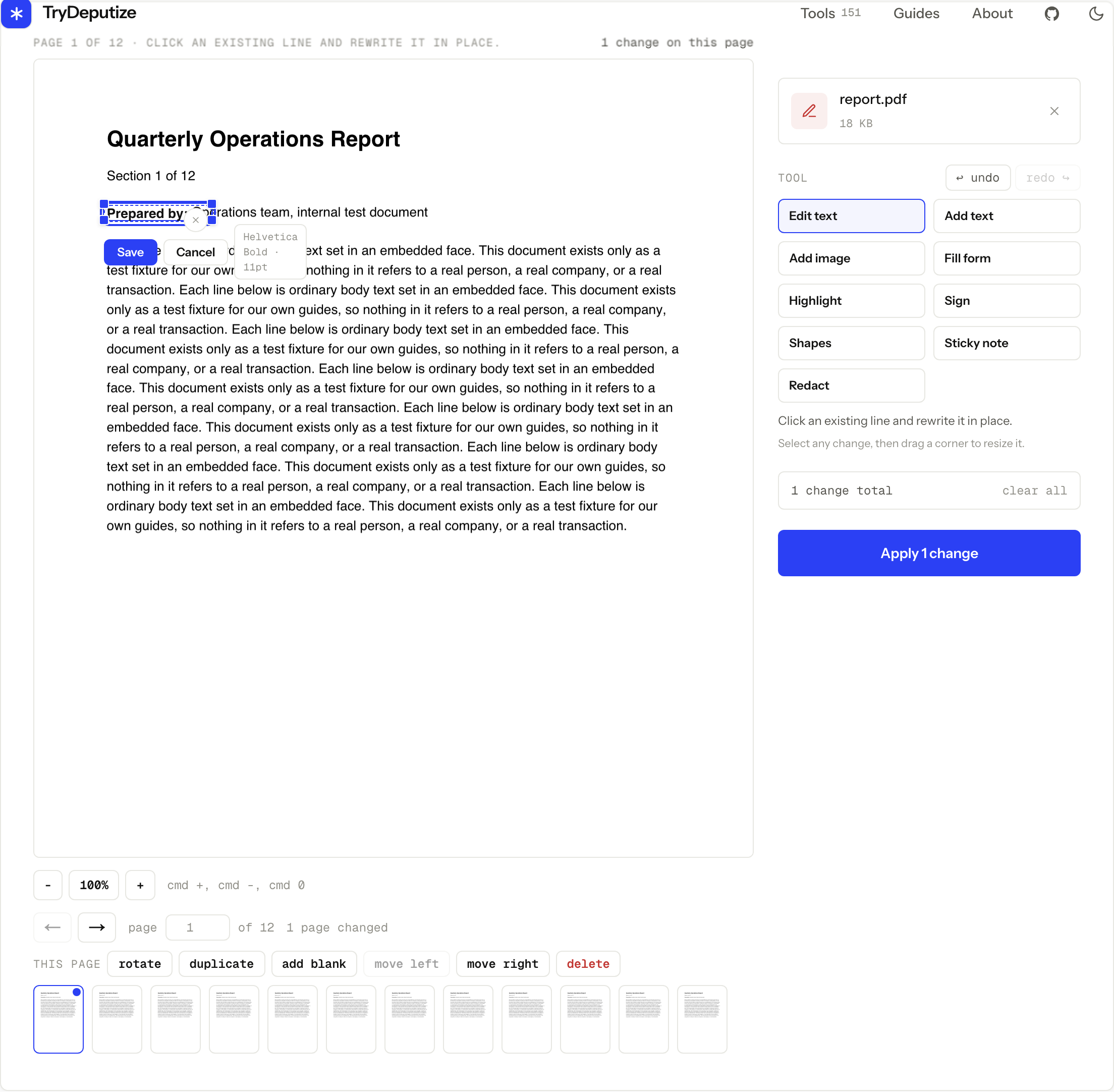
To change text that is already in a PDF, open Edit PDF,
upload the file, choose Edit text, and click the line you want to change.
Retype it, save the line, then apply your changes and download edited.pdf.
The rewritten line is set in the font the document itself embeds, at the size
the editor detected for that line, as long as that embedded font carries every
character you type. No signup, no watermark, no daily limit.
There is one thing worth knowing before you start, because it explains most of the frustration people have with PDF editors: a PDF is a layout format. It records where each run of text sits on a page. It does not store paragraphs that flow, so a rewritten line stays exactly where it was and the lines below it never move.
Rewrite a line that is already on the page
-
Open the editor and add one PDF, up to 50 MB and up to 500 pages.
-
Choose Edit text in the tool panel. Every upright left-to-right line of real text on the page becomes clickable and outlines as you move over it. Hovering a line names the font face and size the editor found for it.
-
Click the line you want to change. Retype it, then press Save. Undo (Cmd+Z) and redo are there if you want the original back.
-
Repeat on the other pages you need. A rewritten line keeps the size the editor detected, and there is no size control in Edit text: the 6 pt to 144 pt range belongs to Add text.
-
Press the apply button, which is labelled with the number of changes you made, such as Apply 3 changes. Download
edited.pdfand open it before you close the tab.
PDF Editor
Edit, sign, fill, organize, and redact PDFs
Free · no signup · files deleted in 60 minutes
The font is the document’s own, not a lookalike
This is the part that decides whether an edit is invisible or obvious. Drop a replacement into whatever font the browser happens to have and the result is close but visibly off: different letterforms, different width, sitting slightly wrong on the baseline. On a form or a contract, that is exactly the kind of detail a reader notices.
Our editor reads the PDF’s own font objects. That is why it can tell you the real embedded face and size of the line you clicked before you type a single character, and why the replacement is set in that face.
There is one case where it cannot. Most PDFs embed a subset of a font: only the glyphs the document already uses, to keep the file small. If your replacement needs a character that subset does not carry, an accented letter or a currency symbol the page never printed, the whole line is set in the closest standard font instead. Mixing the real face with a fallback character by character looks worse than one consistent substitution. Nothing flags this while you type, so it is another reason to open the download and look at the line.
Matching the typeface is the part we control. Whether the new wording actually fits the space it has been given is your call, so open the downloaded file and look at the rewritten line in context.
There is no reflow, and that changes how you edit
If your replacement is longer than the line it replaces, the text below it does not shuffle down to make room. The replacement wraps inside its own box, the box grows downward, and a much longer replacement will overlap whatever sits under it. If the box would have to grow past the bottom of the page, the whole pass stops with “Some text does not fit on the page. Make its box wider or use a smaller size.” Select the box, drag a corner to widen it, and apply again.
So in-place rewriting is at its best when the change is roughly the same length as the original: a date, a name, a price, a version number, a typo, a wrong reference. That covers most of the reasons anyone opens a PDF editor at all.
If you genuinely need to rewrite a paragraph and have everything after it move, a PDF is the wrong place to do that work. Go back to the file the PDF was exported from, change it there, and export a fresh PDF. It is faster than fighting a layout format, and the result will be correct rather than nearly correct. When that original is gone, converting the PDF to Word gets you something that reflows, at the cost of a layout that has been rebuilt rather than copied.
A scanned page has nothing to click
If the page came from a scanner or a phone camera, the words on it are part of an image. There is no text object to click, so Edit text finds nothing and says so on the page: no safely editable horizontal text was found, and scans need OCR first.
Run the file through OCR PDF before you edit it. It deskews and despeckles each page, recognizes the text in one of 13 languages, and returns a searchable PDF: the original page images with a recognized text layer underneath them. It handles up to 60 pages per job, and pages that already carry real text are left alone rather than recognized a second time.
Then bring that output back to the editor, but know exactly what you get. OCR adds an invisible text layer under the page image. The lines become clickable and the file becomes searchable, but the words you can see are still pixels in that image. A rewrite removes the invisible line and draws your replacement on top of the scan, so the original words are still there, underneath the new ones. That is not a fixed line, it is a mess.
To change what a scanned page actually shows, use Redact over the old words and then Add text to type the new ones. A true redaction removes the pixels it covers rather than painting over them, and redactions are applied before any added text, so the new line survives. It will not match the scan’s typeface, because a scan has no font objects to match.
Rotated, vertical, and right-to-left text is a separate case. None of it is available for in-place rewriting yet, even when the text is real, because the editor cannot guarantee the shape of the box it would erase. That means a page of Arabic or Hebrew shows the same empty-state message a scan does, so check whether the page has real text before you send it through OCR.
The limits, and what to do when you hit them
One PDF per job, up to 50 MB, up to 500 pages, and up to 200 changes in a single pass. Text you add yourself runs from 6 pt to 144 pt, and a single text box holds up to 2000 characters.
Those numbers are generous for the ordinary case and easy to route around when they are not. If a job needs more than 200 changes, apply the first batch, download the result, and run it through again. If the document is longer than 500 pages, cut it into workable parts first: the split guide covers page ranges and how to get the parts back out. A file over 50 MB is over the upload cap entirely, so use software on your own machine for that one.
Rewriting is not the only way to change a page
Edit text is for words that are already there. The panel has eight other modes; these three cover the cases Edit text does not:
- Add text places new text anywhere you click, which is the right choice when there is no existing line to rewrite.
- Fill form lists the fields the PDF actually declares and types into them, so the result stays a real filled form rather than text sitting on top of one.
- Redact removes the content underneath for real. It also deletes any form field, link, or attachment the rectangle overlaps, so the covered data cannot be pulled back out of the file. A black rectangle drawn with a shape tool hides text visually and leaves it fully extractable.
What happens to the file you upload
Your PDF travels over HTTPS and is used only to apply the changes you made. The upload and the edited result are both deleted from our server automatically about an hour later, so download the file while the page is still open. The online PDF safety guide goes through the questions worth asking of any server-side tool, including ours.
Automatic deletion is not a policy exemption. If a workplace, school, legal, or healthcare rule says the document must not be processed by a third party, that rule still applies, and the answer is software approved for your device.
When this won’t work
- The page is a scan. There is no text object to click, only an image. OCR makes the lines clickable, but the visible words stay in the image, so a rewrite draws over them instead of replacing them. Use Redact on the old words and Add text for the new ones.
- The replacement is much longer than the original line. Nothing below it reflows, so the box grows downward and overlaps. Fix the wording at the source document instead and export a new PDF.
- The text is rotated, vertical, or right-to-left. In-place rewriting handles upright left-to-right lines only, so rotated, Arabic, and Hebrew lines stay untouched even though they are real text.
- The PDF is over 500 pages or over 50 MB. Split a long document into parts, and use local software for anything past the upload cap.
- The document must never leave your device. Deletion an hour later is not the same as never uploading it. When a rule says local only, treat that as the answer.
Questions
Will the new text match the original font?
It is set in the font the PDF itself embeds for that line, at the size the editor detected, rather than a browser substitute that only looks similar. The exception is a character that font does not carry: most PDFs embed only the glyphs the document already uses, so a replacement needing a new accented letter or symbol is set in the closest standard font instead. Check the rewritten line in the download before you send the file.
Why can I not click any text on my page?
The page is almost certainly a scan or a photo, so there is no text to click, only an image of text. OCR makes it searchable and makes the lines clickable, but the words you see stay in the image, so a rewrite lands on top of them instead of replacing them. On a scan, use Redact over the old words and Add text for the new ones. Rotated, vertical, and right-to-left text is also not available for in-place rewriting, even when it is real text.
Can my replacement be longer than the original line?
It can, but nothing below it moves. A PDF stores placement, not flowing paragraphs, so the replacement wraps inside its own box and the box grows downward, which can overlap the line underneath.
Is there a watermark, a signup, or a daily limit?
None of the three. The output is a clean PDF, there is no account, and you can use the editor as often as you like.
What happens to my PDF after I edit it?
It travels over HTTPS, is used only to apply your changes, and both the upload and the result are deleted from our server automatically about an hour later. Download the file before then.
PDF Editor
Edit, sign, fill, organize, and redact PDFs
Free · no signup · files deleted in 60 minutes
Related guides